BLACK+DECKER 12-CUP Programmable Coffeemaker User Guide
Quick start guide for the BLACK+DECKER 12-CUP Programmable Coffeemaker, covering setup, brewing, auto-brew programming, cleaning, and maintenance.
Table of contents
Quick guide from the manual
This document provides essential instructions for operating the BLACK+DECKER 12-CUP Programmable Coffeemaker. Before first use, wash all removable parts and run a full brew cycle with water only to remove manufacturing residue. The appliance is for household use only and features a 12-cup capacity, programmable auto-brew, and a Sneak-A-Cup pause feature.
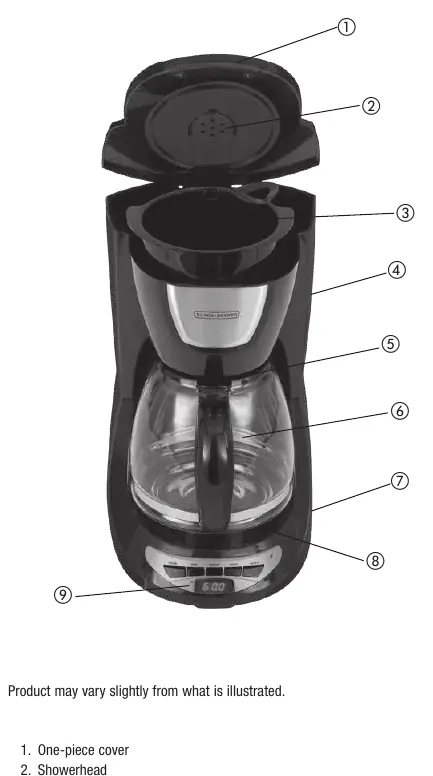
Getting started
Before brewing your first pot of coffee, ensure the unit is clean:
- Remove all packaging and stickers.
- Wash the carafe and brew basket in warm, soapy water.
- Run a full brew cycle with fresh water only (no coffee grounds) to flush the system.
- Discard the water and allow the unit to cool.
Brewing coffee
- Open the one-piece cover and fill the reservoir with fresh, filtered water (do not exceed the 12-cup MAX mark).
- Place a basket-style paper filter into the brew basket.
- Add ground coffee (recommended: 1 heaping tablespoon per cup).
- Ensure the brew-thru lid is properly aligned on the carafe and place the carafe on the Keep Hot plate.
- Press the On/Off (I/O) button to begin brewing.
- The unit will keep coffee hot for 2 hours before automatically turning off.
Sneak-A-Cup feature
This feature allows you to pause the brewing process to pour a cup of coffee. Remove the carafe from the plate; brewing will pause. You must return the carafe to the plate within 30 seconds to prevent overflow.
Setting auto brew time
- Press the PROG button; the AUTO light will blink.
- Use the HOUR and MIN buttons to set your desired start time (ensure the P.M. indicator is correct).
- Press the AUTO button to confirm; the light will stay on.
- Press PROG again to finalize.
- To activate the timer, press the AUTO button.
Cleaning and maintenance
Regular cleaning ensures optimal performance. Wash the brew basket and carafe after every use. To remove mineral deposits, perform a vinegar cleaning cycle once a month:
- Fill the reservoir with white vinegar to the 6-cup line, then add water to the 10-cup line.
- Run half the cycle, turn the unit off, and let it soak for 15 minutes.
- Turn the unit back on to finish the cycle.
- Run a full cycle with fresh water only to remove any remaining vinegar taste.
Practical help
Common problems
Ensure the brew-thru lid is properly aligned on the carafe and do not exceed the 12-cup maximum water level.
This indicates a power interruption; you must reset the time using the HOUR and MIN buttons.
Run an additional full brew cycle with fresh water only to flush out remaining cleaning solution.
Before use
- Wash removable parts (carafe, brew basket) before first use.
- Ensure the unit is placed on a flat, stable surface.
- Check that the power cord is not damaged.
- Verify the brew-thru lid is correctly positioned on the carafe.
Specs in practice
- 12-Cup Capacity
- Maximum water reservoir capacity; one cup equals approximately 5 oz.
- Keep Hot Plate
- Keeps brewed coffee hot for 2 hours before automatic shut-off.
- 900W 120V~ 60 Hz
- Standard electrical requirements for North American outlets.
Images and diagrams
- 1. One-piece cover
- 2. Showerhead
- 3. Removable brew basket
- 5. Sneak-A-Cup feature
- 8. Keep Hot carafe plate
Model compatibility
- For household use only.
- Not intended for outdoor use.
- Do not use abrasive cleansers or scouring pads on the carafe.

Manual page author
David Miller
Documentation analyst
Organizes user manual content into clear summaries, with attention to model details, product context, and everyday usability.