Instruction Manual for BLACK+DECKER 12in. Bump Feed Trimmer/Edger ST4500/ST4500YK
Quick guide for the BLACK+DECKER 12in. Bump Feed Trimmer/Edger (ST4500/ST4500YK). Includes assembly, line replacement, operation, and safety instructions.
Table of contents
Quick guide from the manual
This document provides essential instructions for the safe assembly, operation, and maintenance of the BLACK+DECKER 12in. Bump Feed Trimmer/Edger (Cat. No. ST4500/ST4500YK). Always wear eye protection and ensure the guard is properly installed before use.
Assembly
Before assembly, ensure the tool is unplugged.
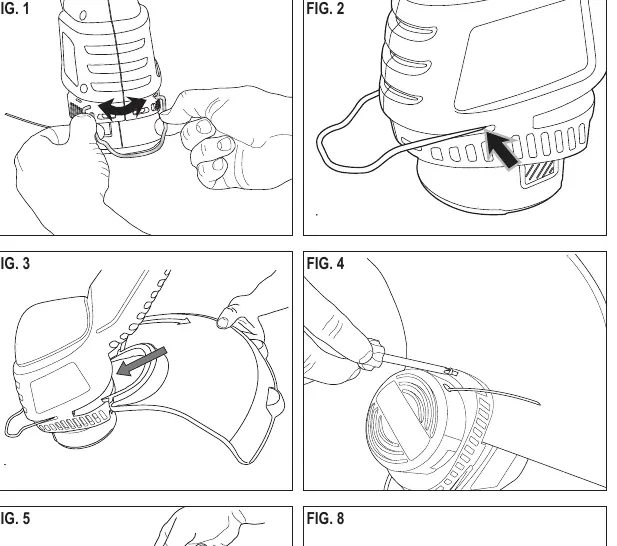
- Locate the edge guide and spread it apart to attach it to the housing.
- Remove the guard attachment screw from the guard.
- Slide the guard onto the trimmer housing, aligning the screw holes.
- Insert and tighten the guard attachment screw.
- Secure the extension cord using the cord retainer.
Operation
The trimmer uses 1.65mm (0.065") diameter round nylon line. To feed the line, gently bump the unit on the ground while it is running.
- Trimming: Angle the unit slightly (10° to 30°) and swing it side-to-side.
- Edging: Turn off the tool. Hold the auxiliary handle, push the trimmer head collar in the direction of the arrow, and rotate the head clockwise until it locks.
Line Replacement
Use only 1.65mm (0.065") diameter round nylon line. Heavier line will overload the motor.
- Unplug the tool.
- Press the release tabs on the sides of the hub to remove the bump cap.
- Remove broken line and wind new line tightly onto the spool, ensuring it stays below the spool flanges.
- Insert the end of the line through the eyelet in the hub and snap the spool back into place.
Maintenance
Clean the tool using only mild soap and a damp cloth. Never immerse the tool in liquid. Repairs should only be performed by authorized service centers using identical replacement parts.
Safety
- Always wear eye and ear protection.
- Keep the work area clean and well-lit.
- Do not operate in explosive atmospheres or near flammable materials.
- Keep children and bystanders away during operation.
- If the power cord is damaged, it must be replaced by the manufacturer or an authorized service center.
Practical help
Common problems
Ensure the line is not tangled or welded together on the spool. Check that the spool is correctly seated and the line is not extending past the spool flanges.
Ensure you are using the recommended 1.65mm (0.065") diameter round nylon line. Heavier line will overload the motor.
Ensure the tool is unplugged and the guard is aligned correctly with the screw holes on the housing before inserting the screw.
Before use
- Check that the guard is firmly in place.
- Inspect the area for wires, cords, or string-like objects.
- Ensure the power cord is not damaged or tangled.
- Wear eye and ear protection.
- Verify the power supply voltage matches the tool rating plate.
Specs in practice
- Cutting Line Diameter
- 1.65mm (0.065") round nylon line only.
Images and diagrams
- Fig. 1-4: Guard and edge guide assembly steps.
- Fig. 5-6: Securing the extension cord.
- Fig. 7-8: Proper trimming angle and motion.
- Fig. 9-10: Converting the tool to edger mode.
- Fig. 11-17: Spool removal and line winding procedure.
Model compatibility
- Use only Black & Decker replacement spool model AF-100.
- Use only 1.65mm (0.065") diameter round nylon line.

Manual page author
Emily Carter
User documentation editor
Prepares concise manual descriptions and highlights the most useful setup, operation, and maintenance information for readers.