User Manual for Accesstyle 1300-FPCS Cordless Screwdriver
Quick guide for the Accesstyle 1300-FPCS Cordless Screwdriver. Learn how to operate, charge, change bits, and maintain your tool safely.
Table of contents
Manual images
Click an image to enlargeQuick guide from the manual
The Accesstyle 1300-FPCS is a cordless screwdriver designed for screwing, unscrewing, and drilling. Before first use, ensure the tool is fully charged and inspect it for any damage. Always wear protective glasses during operation and ensure the work environment is dry and free from excessive dust.
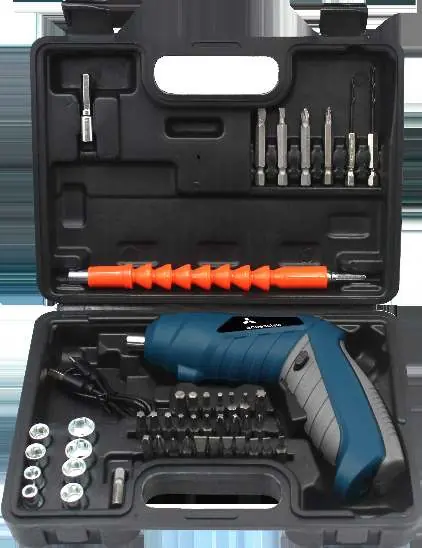
Product Description
The screwdriver features the following components:
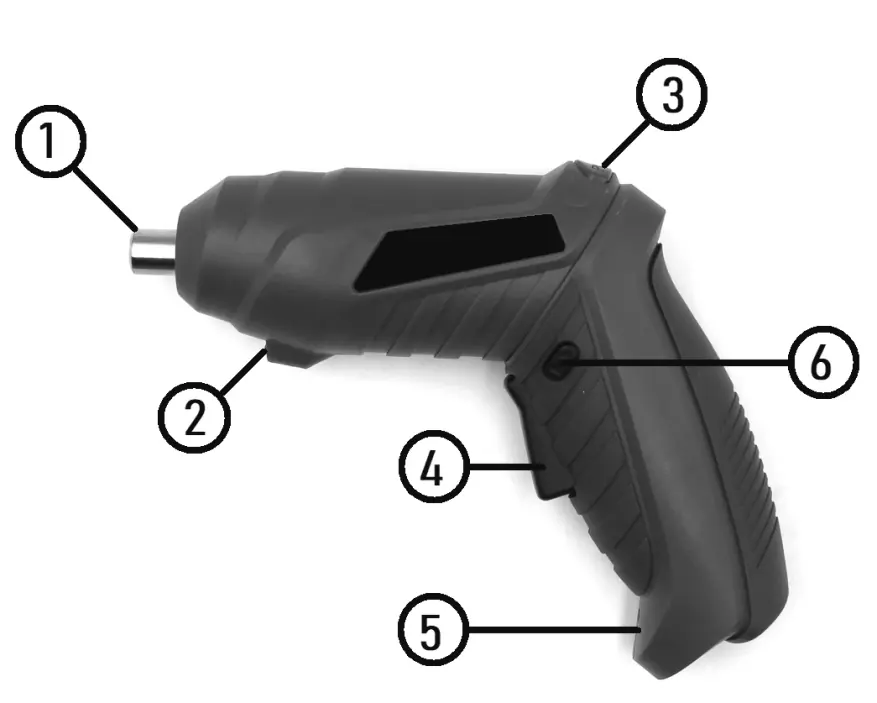
- HEX chuck: For holding bits.
- LED flash: Provides illumination during operation.
- Handle position switch: Allows changing the handle angle.
- Switch button: Used to start and stop the motor.
- Rotation direction switch: Sets the reverse or forward rotation.
- Charging connector: Port for the USB charging cable.
Operation
Charging the Battery:
- Insert the charging cable into the charging connector on the tool.
- Connect the USB end to a charger (not included).
- Connect the charger to a 220V network.
- Charge for 3-5 hours. Do not use the screwdriver while it is charging.
Using the Tool:
- Inserting Bits: Place the bit into the HEX chuck; the built-in magnet will lock it in place.
- Changing Handle Position: Press and hold the handle position switch, rotate the handle to the desired position, and release the switch to lock it.
- Rotation Direction: Use the rotation direction switch to select the desired direction. Only change direction when the motor is completely stopped.
- Spindle Lock: The tool features an automatic spindle lock. When the switch button is off, the spindle locks, allowing you to use the tool as a standard manual screwdriver for higher torque.
Safety and Maintenance
Safety Rules:
- Do not overload the tool; excessive force can damage the gearbox or engine.
- Keep the tool away from children and unauthorized persons.
- Do not operate in explosive atmospheres or wet conditions.
- Stop using the tool if you notice smoke, burning smells, increased noise, or vibration.
Maintenance:
- After use, clean the tool and accessories from dirt.
- Remove the bit from the chuck before storage.
- Store in a dry room at temperatures above 0°C.
- For long-term storage, charge the battery to 100% and lubricate external metal components.
Practical help
Common problems
Check if the battery is charged and the switch button is not jammed.
Ensure the motor is completely stopped before changing the rotation direction switch.
Ensure the charger is connected to a 220V network and the USB cable is properly inserted into the charging connector.
Before use
- Check for completeness of the delivery set.
- Visually inspect the tool and charger for damage.
- Charge the battery fully before first use.
- Ensure the environment is dry and dust-free.
- Wear protective glasses.
- Ensure the handle is locked in the desired position.
Specs in practice
- Max Torque: 3 NM
- The maximum twisting force the screwdriver can apply.
- Max idle speed: 220 rpm
- The rotational speed of the chuck without load.
- Charging time: 120 minutes
- The time required to charge the battery.
- Battery: 3.6V Li-Ion
- The type and voltage of the built-in rechargeable battery.
Images and diagrams
- 3: Handle position switch
- 4: Switch button
- 5: Rotation direction switch
- 6: Charging connector
Model compatibility
- Use only with chargers matching the specified parameters (5V / 0.5A).
- Do not use in explosive atmospheres or wet conditions.
- The tool is designed for temperate climates (0°C to +40°C).

Manual page author
David Miller
Documentation analyst
Organizes user manual content into clear summaries, with attention to model details, product context, and everyday usability.