Electronics / Monitors
AcuRite 1602RX Display for 5-in-1 Weather Sensor
Comprehensive instruction manual for the AcuRite 1602RX display unit, covering setup, operation, calibration, and maintenance for your 5-in-1 weather sensor system.
Table of contents
Product Overview
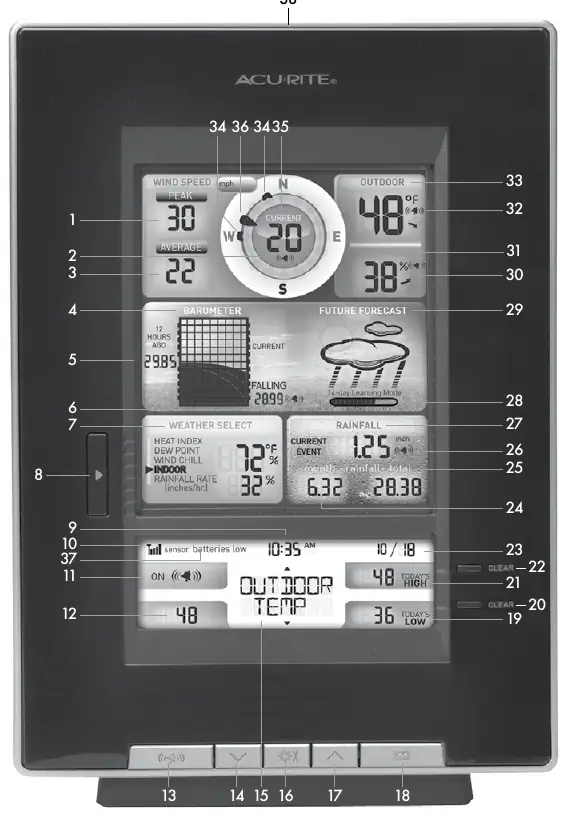
The AcuRite 1602RX is a dedicated display unit designed for use with the 5-in-1 weather sensor. It provides real-time data including wind speed, barometric pressure, rainfall, temperature, and humidity. The unit features a self-calibrating forecasting algorithm that analyzes pressure changes over 14 days to provide personalized weather predictions for your specific location.
Setup and Installation
To ensure continuous operation and data retention during power outages, it is recommended to use both the included power adapter and backup batteries. Important: The A-B-C switch inside the battery compartment must match the setting on your 5-in-1 sensor to ensure proper synchronization.
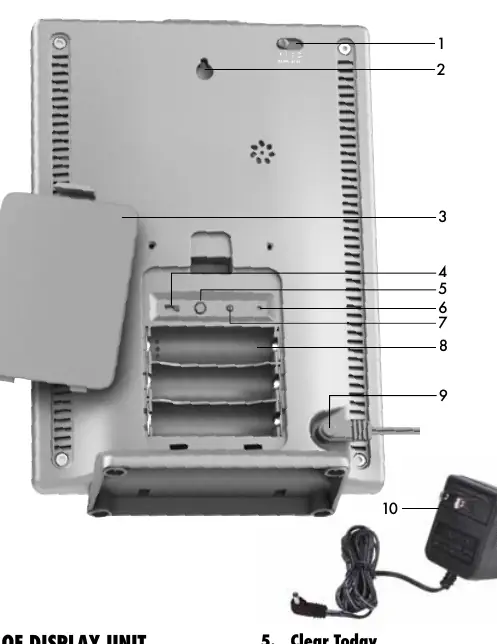
- Power: Plug in the power adapter as the primary source. Install 3 AA alkaline batteries for backup.
- Placement: Position the display in a dry area away from direct sunlight, heat sources, and vents. Maintain at least 3 feet of distance from electronic devices to prevent wireless interference.
- Time and Date: Use the settings menu to configure the clock and calendar for accurate time-stamping of historical data.
Operation and Features
The display offers various programmable weather alarms for temperature, humidity, wind speed, and more. When an alarm condition is met, the unit will beep and flash the relevant data category. You can silence a sounding alarm by pressing any button for snooze or by turning the alarm off.
Care and Maintenance
Keep the display unit clean by wiping it with a soft, damp cloth. Avoid caustic cleaners or abrasives. Regularly clear ventilation ports with a gentle puff of air to ensure accurate sensor readings. If data accuracy is impacted by environmental factors, you can manually calibrate temperature and humidity readings through the settings menu.
Troubleshooting and Specifications
If the device does not operate properly, ensure the wireless range is within 330 feet (100 m) and that there are no large metallic obstructions. The system operates at 433 MHz. For further assistance, visit the AcuRite website or contact customer support.
Related manuals
Related manuals from the same brand or category.
Electronics / Monitors
AcuRite Atomic Alarm Clock 13131A3 Instruction Manual
AcuriteElectronics / Monitors
AcuRite 13019W2 Intelli-Time Alarm Clock
AcuriteDocuments / Warranty Safety
AcuRite 13239CCDI Projection Alarm Clock with Atomic Clock
AcuriteDocuments / Warranty Safety
AcuRite 13003A1 Alarm Clock with Intelli-Time Technology
Acurite
Manual page author
David Miller
Documentation analyst
Organizes user manual content into clear summaries, with attention to model details, product context, and everyday usability.