User Manual for Acurite 3-in-1 Sensor Wind Cups 11146-3N1WC
Quick guide for replacing the wind cups on your Acurite 3-in-1 sensor. Includes step-by-step removal and installation instructions to ensure proper anemometer function.
Table of contents
Manual images
Click an image to enlargeQuick guide from the manual
This document provides instructions for replacing the wind cups on the Acurite 3-in-1 sensor (model 11146-3N1WC). Follow these steps to safely remove the old assembly and install the replacement.
Replacing the Wind Cups
Follow these steps to replace the wind cups on your sensor:
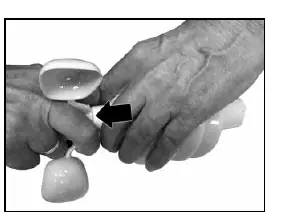
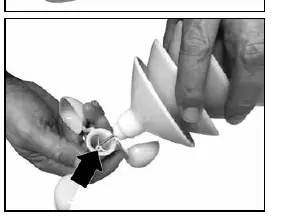
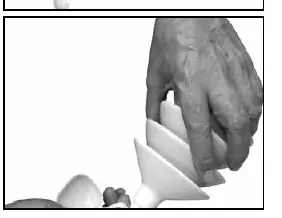
- Remove old cups: Secure your fingers between the wind cups. Pull the base of the wind cup assembly away from the sensor while holding the sensor with your free hand. Tip: Hold the sensor close to your body to maximize pulling strength. Caution: Broken edges of the wind cup may be sharp.
- Align: Line up the mounting hole on the replacement wind cups with the spindle on the sensor. Tip: Place one drop of light machine oil or spray lubricant on the spindle to ensure the anemometer will spin freely.
- Attach: Insert the spindle onto the sensor and apply pressure to ensure the wind cups are properly secured.
Customer Support
For assistance, contact Acurite Customer Support at 877-221-1252 or visit www.AcuRite.com.
Official resources from the manual
Manufacturer information
AcuRite
Practical help
Common problems
Apply a drop of light machine oil or spray lubricant to the spindle.
Before use
- Ensure the sensor is held close to the body for better leverage when removing old cups.
- Have light machine oil or spray lubricant ready for the spindle.
- Check for sharp edges on broken wind cups before handling.

Manual page author
David Miller
Documentation analyst
Organizes user manual content into clear summaries, with attention to model details, product context, and everyday usability.