Lightning Sensor Installation Guide for Acurite 06075M
Learn how to install the Acurite 06075M Lightning Sensor with this quick guide. Follow simple steps to insert the sensor module into your device.
Table of contents
Quick guide from the manual
This document provides the necessary steps to install the Acurite 06075M Lightning Sensor module into your compatible Acurite device. Ensure you have the sensor module ready before beginning the installation process.
Installation
Follow these steps to correctly install the lightning sensor module:
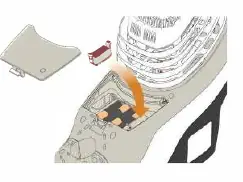
- Remove the battery compartment cover from your Acurite device.
- Align the sensor notch with the designated module slot inside the battery compartment.
- Press the lightning sensor downward firmly until you hear the clips click into place, indicating it is securely seated.
- Replace the battery compartment cover to complete the installation.
Support
For further assistance or troubleshooting, please visit the official support website at support.acurite.com.
Official resources from the manual
Manufacturer information
AcuRite
Practical help
Before use
- Ensure you have the Acurite 06075M Lightning Sensor module.
- Locate the battery compartment on your Acurite device.
- Ensure the device is powered off or safe to open before accessing the battery compartment.
Images and diagrams
- The diagram illustrates the battery compartment area and the correct orientation of the sensor module notch aligning with the slot.

Manual page author
Michael Turner
Technical manual editor
Reviews PDF manuals for structure, safety notes, and practical product details so readers can find the right information quickly.