Lead Compensation Guide for AEMC 6550 and 6555 Megohmmeter
Quick guide for configuring lead compensation on AEMC 6550 and 6555 megohmmeters. Learn how to identify test leads and set the correct 44kΩ or 0kΩ compensation.
Table of contents
Quick guide from the manual
This document provides instructions for configuring the lead compensation feature on AEMC 6550 and 6555 megohmmeters. This setting is necessary to ensure accurate measurements when using test leads with internal resistors.
Lead Identification
The standard test leads (Cat. #2151.36) supplied with the 6550 and 6555 models contain a 22kΩ resistor at each end to limit peak short circuit current. These leads will not pass a standard continuity test and will measure 44kΩ.
- Marked leads: Identified by a black section near one end or K22 markings. These require 44kΩ compensation.
- Older leads: No markings. These require 0kΩ compensation.
Configuration Procedure
To enable or change the lead compensation setting (requires firmware version 2.1 or later):
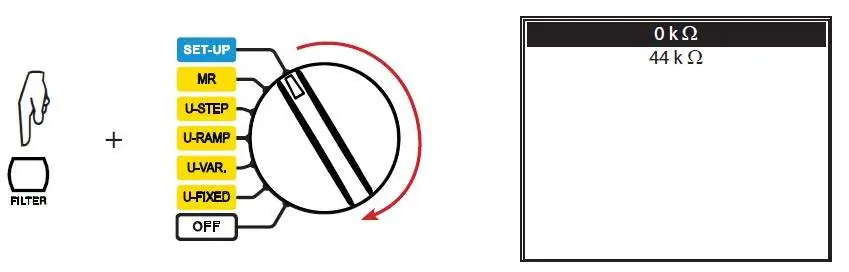
- Press and hold the Filter button.
- While holding the button, turn the rotary switch from the OFF position to the SET-UP position.
- Use the ▲ and ▼ arrow keys to select either 44kΩ or 0kΩ.
- Use the ► arrow key to select the highlighted entry.
- The meter will reboot after a few seconds, and the value will be saved.
Practical help
Common problems
This is expected behavior for leads with 22kΩ resistors; they will measure 44kΩ. Ensure 44kΩ compensation is enabled.
Before use
- Check if leads have a black section or K22 marking
- Verify firmware version is 2.1 or later

Manual page author
David Miller
Documentation analyst
Organizes user manual content into clear summaries, with attention to model details, product context, and everyday usability.