General / Other Manuals
AlorAir Storm SLGR 1600X Dehumidifier
Comprehensive guide for the AlorAir Storm SLGR 1600X dehumidifier, covering installation, operation, maintenance, troubleshooting, and safety instructions.
Table of contents
Product Overview
The AlorAir Storm SLGR 1600X is a high-performance dehumidifier designed for restoration and moisture control. It utilizes an integral humidistat to monitor the environment, drawing air across an evaporator coil to condense moisture, which is then reheated and distributed back into the room.
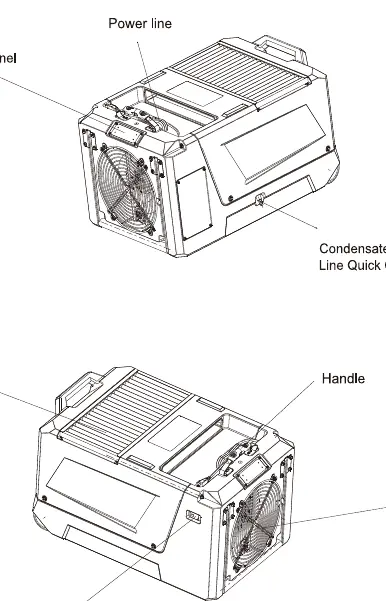
Safety Instructions
- Do not alter or adjust the unit.
- Always unplug the unit before removing the housing.
- Use only on a 115V/60Hz circuit protected by a GFCI outlet.
- Do not use extension cords or plug adapters.
- Inspect the power cord for damage before use.
Operation and Setup
The unit features a digital control panel for managing humidity levels, operating modes, and monitoring system status. The default humidity setpoint is 50%, adjustable between 25% and 80%. The unit includes a manual drain button to clear the internal pump reservoir before moving or storage.
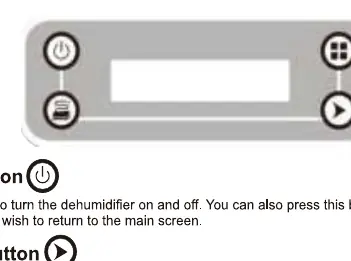
Display Functions
- Main Screen: Displays unit status, total operating hours, and inlet temperature/humidity.
- Sub-menus: Allow for clearing job hours, switching temperature units (Celsius/Fahrenheit), adjusting humidity setpoints, and selecting language preferences.
- System Indicators: Includes specific screens for defrosting cycles, compressor delay, and pump purging status.
Maintenance
Regular maintenance is essential for optimal performance:
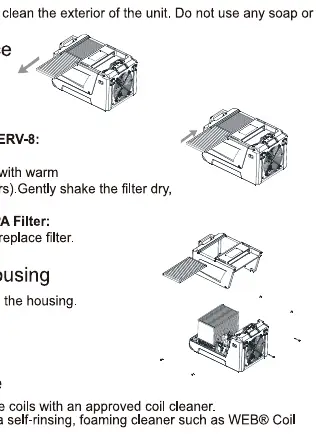
- Filter Maintenance: Inspect regularly. Clean pre-filters by vacuuming or washing with warm water. Replace carbon or HEPA filters if dirty.
- Coil Maintenance: Clean coils once per year using an approved self-rinsing, foaming coil cleaner.
- Pump Maintenance: Periodically remove the housing to clean the pump reservoir and ensure the drain line is clear.
- Exterior: Clean the unit body with a soft, damp cloth. Do not use solvents.
Troubleshooting and Error Codes
The system displays error codes to assist in diagnostics:
- E1: Humidity sensor error.
- LO: Inlet air temperature below operating range (below 33.8°F).
- HI: Inlet air temperature above operating range (above 110°F).
- E4: Pump issue or high water level detected.
- E5: Refrigerant leak detected.
If the unit fails to operate, verify power connections, ensure the filter is clean, and check that air inlet/outlet paths are not obstructed.
Storage
For extended storage, turn off the unit, allow it to dry, clean the pump reservoir, wrap the power cord, cover the filter mesh, and store in a clean, dry environment.
Related manuals
Related manuals from the same brand or category.
General / Other Manuals
AlorAir 1400X Sentinel SLGR Dehumidifier
AlorairHome Appliances / Washing Machines
ALORAIR Storm SLGR 1250X Dehumidifier
AlorairElectronics / Monitors
ALORAIR Storm SLGR 1250X Commercial Grade Dehumidifier
AlorairElectronics / Monitors
AlorAir Storm SLGR 1250X Commercial Dehumidifier
Alorair
Manual page author
Emily Carter
User documentation editor
Prepares concise manual descriptions and highlights the most useful setup, operation, and maintenance information for readers.