Electronics / Audio Processors
User Manual for Altec Lansing HydraShock 2.0 Wireless Speaker
Quick guide for the Altec Lansing HydraShock 2.0 wireless speaker. Learn how to pair via Bluetooth, use Party Sync, control music, charge devices, and maintain your speaker.
Quick answers from the manual
Quick answer
- This manual provides instructions for charging, Bluetooth pairing, using Party Sync, controlling music and calls, and resetting the Altec Lansing HydraShock 2.0 speaker. p. 8, 9, 10, 11
Key actions
- Charging the speaker p. 8
- Bluetooth Pairing p. 9
- Party Sync p. 11
First start
- Charging p. 8
Technical specifications
| Parameter | Value | Meaning | Pages |
|---|---|---|---|
| Power input | DC18V 2.5A | Input power requirement | p. 13 |
| USB output | 5V 0.5A | USB charging output | p. 13 |
| Wireless Charge Pad | 5W Max | Wireless charging output power | p. 13 |
| Battery Type | Lithium-ion Battery | Internal battery chemistry | p. 13 |
| Play Time | Approximately 20 Hours | Battery life at 50% volume | p. 13 |
Where to find it in the PDF
- Support and Contact p. 1, 4, 14
- In the Box p. 6
- Controls Diagram p. 7
- Charging p. 8
- Bluetooth Pairing p. 9
- Speaker Controls p. 10
- Advanced Features p. 11
- Safety Precautions p. 12
Table of contents
Manual images
Click an image to enlargeQuick Guide
This guide provides essential instructions for operating your Altec Lansing HydraShock 2.0 speaker. For technical support, you can call 1-855-292-4087 or email [email protected]. Always ensure the sealing flap is fully closed to maintain the speaker's waterproof rating.
In the Box
- HydraShock 2.0 Wireless Speaker
- AC Adaptor
- Bungee Cord
- 2 Mounts
- Quick Start Guide
There is a 1/4" threaded mounting insert on the bottom for standard mounts.
Device Overview
The top panel features the following controls:
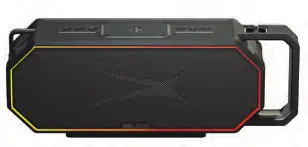
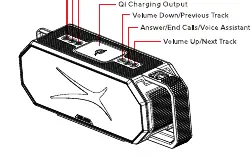
- LED Indicator Light
- Power/Play/Pause Button
- Link Button (Party Sync)
- Color Change Button
- Qi Charging Output
- Volume Down/Previous Track
- Answer/End Calls/Voice Assistant
- Volume Up/Next Track
The rear panel contains the USB Charging Output and the DC IN 18V port.
Charging
Speaker Charging: Insert the DC18V plug of the supplied AC adaptor into the charging port on the right side. The LED will be red while charging and turn off when fully charged.
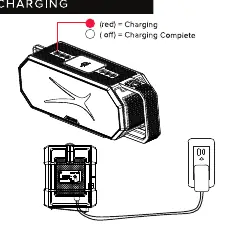
Charging External Devices:
- Wireless Qi Pad: Place a Qi-compatible device on the charging pad. Ensure no other objects are on the pad. If volume is >50%, charging is reduced to 50% to conserve battery.
- USB A Output: Connect your device to the USB A port with a suitable cable.
Note: Only one charging type can be used at a time. Qi charging is given priority.
Bluetooth Pairing
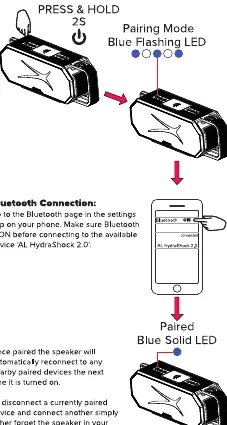
- Press and hold the Power button for 2 seconds to turn on the speaker.
- The speaker will enter pairing mode (Blue flashing LED).
- Go to the Bluetooth settings on your phone and select 'AL HydraShock 2.0'.
- Once paired, the LED will turn solid blue.
To disconnect, turn off Bluetooth on your phone or press and hold the Voice Assistant button for 5 seconds.
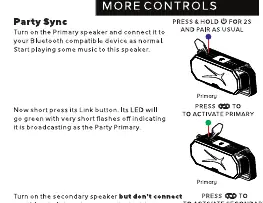
Party Sync
- Connect the primary speaker to your device via Bluetooth and start music.
- Press the Link button on the primary speaker; its LED will flash green.
- Turn on the secondary speaker (do not connect to Bluetooth).
- Press the Link button on the secondary speaker. It will connect to the primary speaker, and its LED will turn solid green.
To exit Party Sync, press the Link button on each speaker.
Light Modes
Briefly press the Color Change button to cycle through 12 different light modes, including fade, pulse to music, single color, and various fire/bargraph effects.
Safety Precautions
- Read all instructions before use.
- Do not expose to excessive heat, fire, or temperatures above 100°F.
- Do not attempt to repair the product yourself.
- Keep charging cables away from flammable materials.
- Ensure the sealing flap is fully closed to maintain waterproof rating.
- Clean only with a soft, dry cloth.
Specifications
- Power Input: DC18V 2.5A
- USB Output: 5V 0.5A
- Wireless Charge Pad: 5W Max
- Battery Type: Lithium-ion
- Play Time: Approximately 20 hours (at 50% volume)
Manufacturer information
Altec Lansing
Practical help
Common problems
Speaker not pairing
Ensure Bluetooth is ON on your device. Press and hold the power button for 2 seconds to enter pairing mode (Blue flashing LED).
Party Sync not working
Ensure the primary speaker is connected to your device first. Press the Link button on the primary speaker (LED flashes green), then press the Link button on the secondary speaker (LED turns solid green).
Waterproof failure
Ensure the sealing flap is fully closed before exposing the speaker to water.
Before use
- Charge the speaker fully using the provided AC adaptor.
- Ensure the sealing flap is closed.
- Download the Altec Lansing app (optional).
Specs in practice
- Wireless Charge Pad
- 5W Max output for Qi-compatible devices.
Images and diagrams
- The top panel contains controls for volume, playback, and lighting.
- The rear panel features the USB charging output and DC input.
Model compatibility
- Qi-compatible devices for wireless charging.
- Bluetooth-enabled devices for audio playback.

Manual page author
David Miller
Documentation analyst
Organizes user manual content into clear summaries, with attention to model details, product context, and everyday usability.