User Manual for Choetech PD8008 100W Desktop GaN Charger
Quick guide for the Choetech PD8008 100W Desktop GaN Charger. Includes specifications, usage instructions, and safety precautions.
Table of contents
Quick guide from the manual
This document provides instructions for the Choetech PD8008 100W Desktop GaN Charger. To use the device, connect it to a power supply and then connect your computer, phone, or tablet using appropriate charging cables.
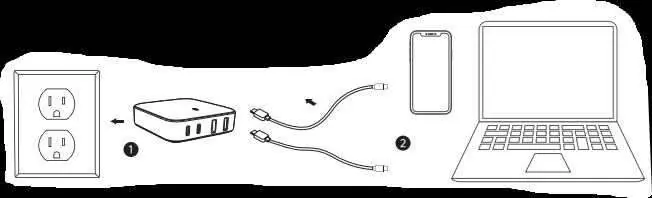
Package List
- 1 x 100W Desktop GaN Charger
- 1 x User Manual
Specifications
Interface: 2 x USB-C, 2 x USB-A
Input: 100-240V ~ 50/60Hz, 2.5A Max
Total Output: 100W (Max)
The charger supports various output configurations depending on the number of devices connected, ranging from single-port 100W output to multi-port combinations.
Safety Precautions
- For best performance, use original or certified fast charging cables.
- Do not expose the charger to rain or excessive moisture.
- Do not use or store the charger in extreme temperatures.
- Do not drop, knock, or disassemble the charger.
Practical help
Common problems
Ensure you are using original or certified fast charging cables.
Verify that the charger is securely connected to a functional power outlet.
Before use
- Check if the power outlet is functional.
- Ensure you have compatible USB-C or USB-A cables for your devices.
- Verify the device is not exposed to moisture or extreme temperatures.

Manual page author
David Miller
Documentation analyst
Organizes user manual content into clear summaries, with attention to model details, product context, and everyday usability.