User Manual for Amazon Basics HDMI Cable
Quick guide for the Amazon Basics HDMI cable. Learn how to correctly connect your devices using this unidirectional cable to ensure proper signal transmission between input sources and output displays.
Table of contents
Quick guide from the manual
This Amazon Basics HDMI cable is designed for unidirectional transmission. It is not a bi-directional cable, meaning it only transmits signals in one specific direction: from the Input source to the Output display. Using the cable in the wrong direction will result in no signal.
Connection Instructions
To ensure proper signal transmission, connect the cable ends to the correct devices:
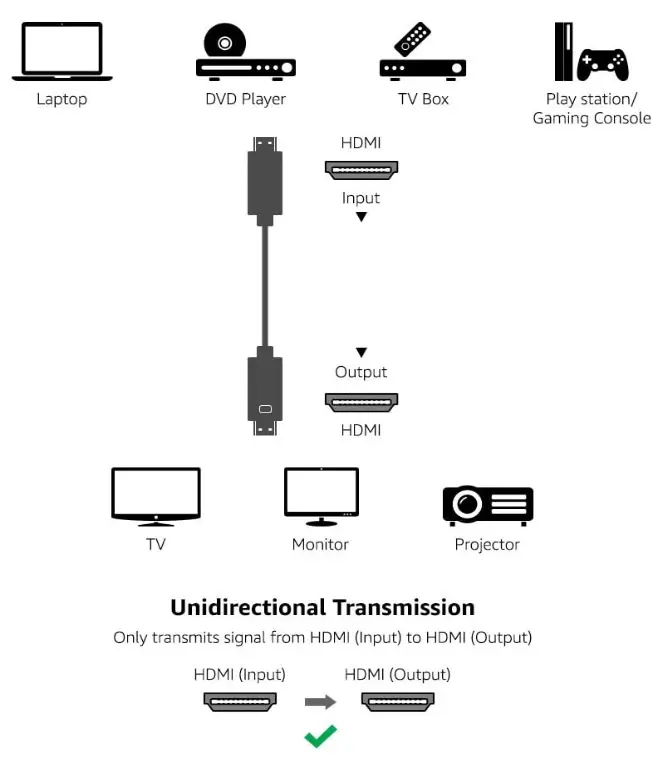
- Input Side: Connect this end to your source device, such as a DVD player, TV box, gaming console, or laptop.
- Output Side: Connect this end to your display device, such as a TV, monitor, or projector.
Identifying the Connectors
The display connector (Output side) is clearly marked with a monitor logo to help you distinguish it from the input connector.
Practical help
Common problems
Ensure the cable is connected in the correct direction. The Input end must be connected to the source (e.g., DVD player) and the Output end to the display (e.g., TV).
Before use
- Identify the source device (Input)
- Identify the display device (Output)
- Locate the monitor logo on the Output connector

Manual page author
Emily Carter
User documentation editor
Prepares concise manual descriptions and highlights the most useful setup, operation, and maintenance information for readers.