Ariston Clima Wi-Fi App for Dehumidifiers
Quick start guide for the Ariston Clima Wi-Fi application, covering account registration, device configuration, and control panel features for Ariston dehumidifiers.
Table of contents
Product Overview
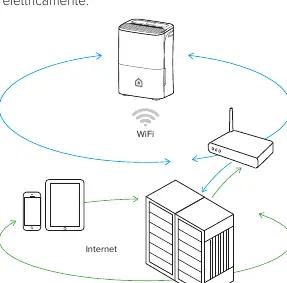
The Ariston Clima application allows for remote management of your Ariston dehumidifier via external servers. This enables you to control the device from anywhere, provided your mobile device has a data connection and the dehumidifier is powered on and connected to your home Wi-Fi network.
Safety Precautions
- Always follow the instructions in this manual.
- Do not get the Wi-Fi module wet, as this poses a risk of electrocution or fire.
- Avoid using the product near medical equipment, pacemakers, or cardiac defibrillators due to potential electromagnetic interference.
- Keep away from automatic control devices, firefighting equipment, and microwave ovens to prevent operational interference.
- The Wi-Fi module is installed internally; do not attempt to remove, modify, or repair it. Contact an Authorized Technical Assistance Center for malfunctions.
Getting Started
To begin, download the Ariston Clima app from your device's app store. You must register an account within the application before proceeding with the device setup. Ensure your mobile device's camera is at least 5 MP for QR code scanning.
Configuration
To connect your dehumidifier:
- Activate AP Mode: Turn on the dehumidifier and hold the designated button (WIRELESS or MODE, depending on the model) for 3 seconds. The "AP" indicator confirms the device is in Access Point mode, which remains active for 8 minutes.
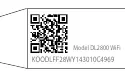
- Association: Use the app to scan the QR code located on the back of the dehumidifier or perform a manual setup by connecting to the device's temporary Wi-Fi network (default password: 12345678).
- Finalize: Select your home Wi-Fi network within the app, enter your password, and complete the configuration.
Control Panel Features
The app provides access to various functions, including:
- ON/OFF: Power the unit on or off.
- Standard Mode: Adjust desired humidity levels.
- Auto: Automatically maintains humidity between 45% and 55% for optimal comfort.
- Continuous Mode: Operates at maximum capacity without time limits.
- Fan Speed: Select between Low, Medium, or High settings.
- Laundry: Automatically optimizes fan speed and humidity based on ambient temperature.
- Air Purifier (DEOS 21s NET only): Activates air purification when the HEPA filter is installed.
- Anti-Mould (DEOS 21s NET only): Sets fan speed and operation time (up to 4 hours) based on humidity.
Maintenance and Disposal
You can manage your profile settings, including photo, name, and password, directly through the app's homepage. Regarding disposal, this product is subject to WEEE regulations. It must be collected separately at the end of its life cycle and delivered to appropriate municipal collection centers or returned to a retailer when purchasing an equivalent new appliance.

Manual page author
Michael Turner
Technical manual editor
Reviews PDF manuals for structure, safety notes, and practical product details so readers can find the right information quickly.