General / Other Manuals
ASAKUKI 100-DF031 Smart WiFi Essential Oil Aromatherapy Diffuser User Guide
Comprehensive user guide for the ASAKUKI 100-DF031 Smart WiFi Essential Oil Diffuser, covering setup, TuyaSmart app integration, Amazon Alexa voice control, and maintenance.
Table of contents
Manual images
Jump to the sectionProduct Overview
The ASAKUKI 100-DF031 is a premium smart essential oil diffuser designed to enhance your home environment. It features WiFi connectivity, allowing for remote control via the TuyaSmart app and integration with Amazon Alexa for voice-activated operation. The device combines aromatherapy with smart home technology to provide a customizable and relaxing experience.
Connecting Preparation
Before initial use, ensure the device is placed near your WiFi router. Prepare your WiFi network name and password. Connect the power adapter to the device and plug it into a power outlet. Download the TuyaSmart app from the Apple App Store or Google Play Store. Ensure you have added water to the tank using the provided measuring cup before operation.
Connecting to WiFi
To pair the device, ensure the green indicator light is blinking rapidly. If it blinks slowly, press and hold the WiFi button for 3 seconds to reset the frequency. Open the TuyaSmart app, select the device, and enter your WiFi credentials. Wait for the connection process to reach 100%. Once connected, you can rename your diffuser and control it directly through the app interface.
APP Control Guide
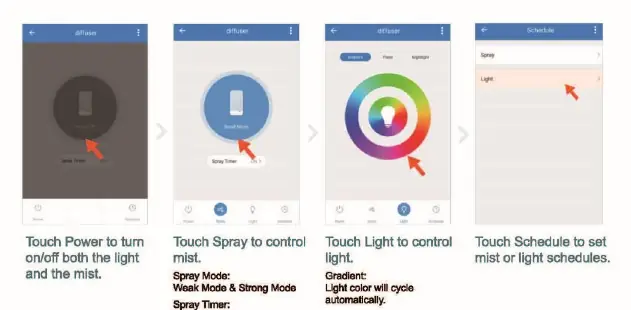
The TuyaSmart app provides full control over the diffuser's functions. You can turn the mist and light on or off, adjust mist intensity between weak and strong modes, and set a spray timer for 1H, 3H, or 6H. The light settings allow for gradient color cycling, fixing a specific color, or adjusting brightness for nightlight mode. You can also schedule mist and light operations.
Amazon Alexa Integration
To control the diffuser with voice commands, enable the TuyaSmart skill in the Alexa app and link your account. Once linked, you can use commands such as turning the diffuser on or off, changing colors, or adjusting LED brightness. Ensure you follow the specific voice command syntax provided in the manual for optimal responsiveness.
Manual Operation and Maintenance
The device can also be operated manually using the buttons on the unit. The MIST/WIFI button toggles the mist function. The HIGH/LOW button adjusts mist intensity, indicated by beeps. The LIGHT button cycles through colors or fixes a specific color. Long-pressing the light button turns it off. Always ensure the device is unplugged before cleaning or maintenance. If you encounter connection issues, ensure you are using a 2.4GHz network, as 5GHz is not supported.
Manufacturer information
Asakuki
Practical help
Common problems
Device fails to connect to WiFi
Ensure you are using a 2.4GHz network, move closer to the router, or unplug the device for 2 minutes and try again.
Router is 5GHz only
Temporarily disable 5GHz frequency or set up a guest network to allow the 2.4GHz connection.
Alexa not responding to commands
Ensure the device is correctly linked in the Alexa app and use the exact voice command syntax provided.
Before use
- Place device near WiFi router
- Prepare WiFi name and password
- Download TuyaSmart app
- Fill water tank using measuring cup
- Connect power adapter to device
- Ensure green indicator is blinking rapidly
Specs in practice
- Tank Capacity
- 700ML maximum water volume.
- Working Frequency
- 2.4MHz ultrasonic vibration frequency.
Images and diagrams
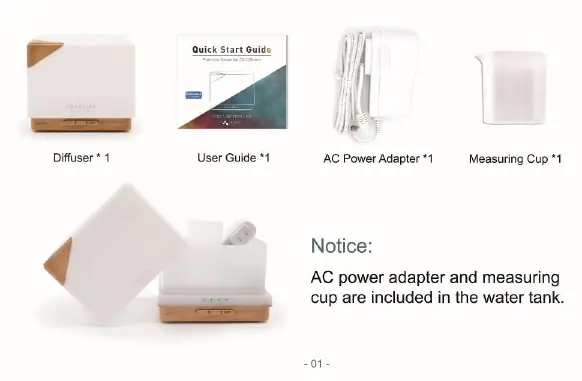
- The diffuser includes a power adapter and measuring cup stored inside the water tank.
- The power port is located on the side of the wooden base.
- The TuyaSmart app interface allows for mist mode, timer, and color light adjustments.
- Alexa voice commands support on/off, color changes, and brightness adjustments.
Model compatibility
- Supports 2.4GHz WiFi networks only.
- Compatible with Amazon Alexa.
- TuyaSmart app available for iOS and Android.

Manual page author
David Miller
Documentation analyst
Organizes user manual content into clear summaries, with attention to model details, product context, and everyday usability.