Home Appliances / Refrigerators
AstroAI 10L Temperature Control Mini Fridge Instruction Manual
Comprehensive user guide for the AstroAI 10L Temperature Control Mini Fridge, covering setup, operation modes, maintenance, and troubleshooting.
Table of contents
Product Overview
The AstroAI 10L Temperature Control Mini Fridge is a versatile, portable appliance designed for both cooling and warming items. It is compatible with both 12V car power outlets and standard 110V-120V AC wall outlets, making it ideal for travel, office, or home use. The unit features a digital temperature display and intuitive controls to set your desired temperature.
Safety Information
To ensure safe operation, always connect the device to a suitable power source as specified. Do not block the air vents; maintain at least 2 inches of clearance around the back and sides for proper heat dissipation. Avoid using the fridge in poorly ventilated areas or near corrosive substances. The device is not intended for use by children without adult supervision. Always disconnect the power supply when the unit is not in use for extended periods.
Operating Instructions
To start using the fridge, connect the appropriate power cord (AC or DC) to the port at the rear of the unit. Once powered on, the default temperature will be displayed. Use the UP and DOWN buttons to adjust the target temperature. To switch between Celsius and Fahrenheit, press and hold both the UP and DOWN buttons simultaneously for three seconds. For optimal cooling performance, it is recommended to pre-chill items before placing them inside the fridge. The unit also features a WARM mode, which can be activated by raising the temperature to 68°F (20°C) or higher.
Modes and Maintenance
The fridge includes a Sleep Mode, which operates at a lower noise level and consumes less energy, though cooling performance may be slower. For maintenance, always disconnect the power before cleaning. Use a damp cloth and mild cleaner to wipe the exterior. Ensure the interior is completely dry before storing the unit. Avoid frequent door opening to prevent condensation buildup. If the fridge is not cooling or working as expected, check the power connections, ensure the fan is unobstructed, and verify that the ambient temperature is within a reasonable range for the device to function effectively.
Manufacturer information
AstroAI
Practical help
Common problems
Device does not work
Check power connections, ensure the plug has good contact, and verify the power source matches the required voltage.
Device does not cool
Ensure the unit is set to the Cool setting, check that the fan is working, and ensure the ambient temperature is not too high.
Condensation water buildup
Avoid opening the door frequently and do not place hot objects directly into the fridge.
Poor heat dissipation
Ensure at least 2 inches of space around the unit and avoid using it in high-temperature environments.
Before use
- Ensure the power source matches the appliance rating plate.
- Check that the power socket is within easy reach.
- Verify the unit is placed in a well-ventilated area.
- Ensure at least 2 inches of clearance around the back and sides.
- Check that the power cable is not bent or stretched.
Specs in practice
- Operating Temperature
- Capable of chilling relative to ambient temperature and heating up to 140°F (60°C).
Images and diagrams
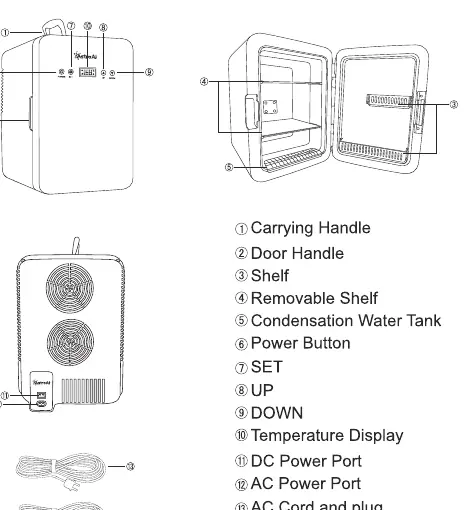
- The front panel features the Power button, SET button, Temperature Display, and UP/DOWN adjustment buttons.
- The rear panel contains the DC power port and AC power port.
- The interior includes a removable shelf for flexible storage.
- A condensation water tank is located at the bottom of the interior.
- The unit comes with both an AC cord and a DC car cigarette lighter cord.
Model compatibility
- Compatible with 12V vehicle cigarette lighter sockets.
- Compatible with standard 100-120V AC wall outlets.
- Not suitable for direct connection to 24V heavy-duty vehicle sockets.

Manual page author
Emily Carter
User documentation editor
Prepares concise manual descriptions and highlights the most useful setup, operation, and maintenance information for readers.