User Manual for ASUS 100W 3-Port GaN Charger AC100-02
Quick start guide and technical specifications for the ASUS 100W 3-Port GaN Charger (AC100-02). Learn how to use the interchangeable plugs, understand power output configurations, and optimize laptop charging.
Table of contents
Manual images
Click an image to enlargeQuick Guide: Using the Charger
The ASUS 100W 3-Port GaN Charger features a versatile design with interchangeable plugs depending on your region.
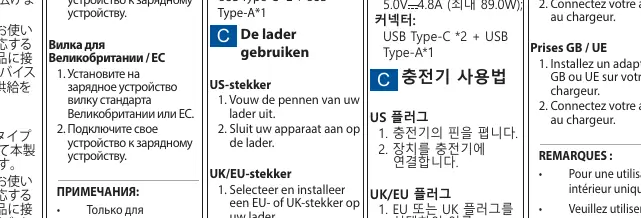
US Plug
- Unfold the pins of your charger.
- Connect your device to the charger.
UK/EU Plug
- Select and install the appropriate EU or UK plug adapter onto your charger.
- Connect your device to the charger.
Technical Specifications
The charger supports multiple output configurations depending on which ports are in use:
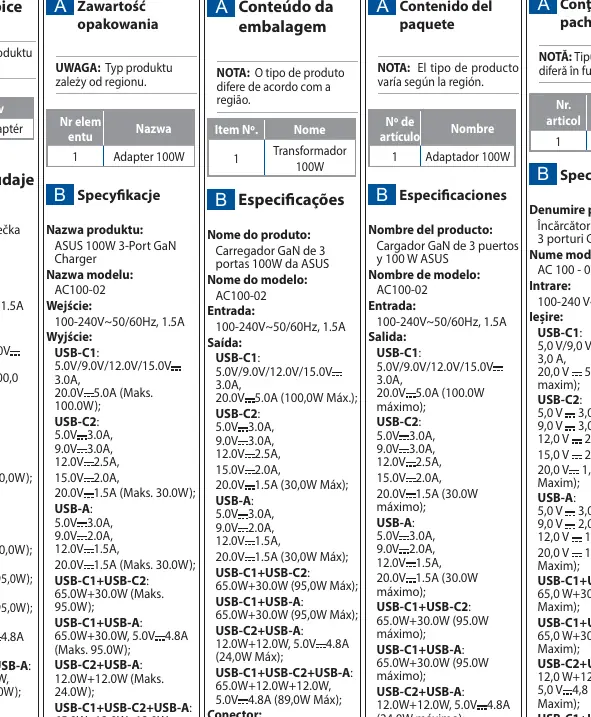
- Input: 100-240V~50/60Hz, 1.5A
- USB-C1: Up to 100W (5V/9V/12V/15V 3A, 20V 5A)
- USB-C2: Up to 30W
- USB-A: Up to 30W
- Combined Output: The charger intelligently distributes power when multiple devices are connected (e.g., 65W+30W for dual USB-C/A connections).
Important Notes
- Indoor Use Only: This device is designed exclusively for indoor use.
- Laptop Charging: To achieve optimal charging performance for your laptop, please use a USB Type-C cable that supports 5A current.
- Regional Variations: The product type and included plugs may vary based on your region.
Manufacturer information
ASUSTeK Computer Inc.
Practical help
Common problems
Ensure you are using a USB Type-C cable that supports 5A current to enable full charging performance.
Verify that you have installed the correct regional adapter (UK or EU) provided with the charger, or use the foldable US pins if applicable.
Before use
- Check the package contents to ensure you have the correct plug for your region.
- Verify the charger is intended for indoor use only.
- Ensure you have a 5A-rated USB Type-C cable if you intend to charge a laptop.

Manual page author
Emily Carter
User documentation editor
Prepares concise manual descriptions and highlights the most useful setup, operation, and maintenance information for readers.