Power / Batteries Chargers
ASUS ROG 140W USB-C GaN Charger / AC140-01
High-performance 140W GaN USB-C charger designed for ROG laptops, tablets, and mobile devices, featuring multiple ports and advanced power delivery.
Table of contents
Product Overview
The ASUS ROG 140W USB-C GaN Charger (AC140-01) is a high-efficiency power adapter utilizing GaN technology to provide compact and powerful charging. It is designed for indoor use and supports a wide range of devices including laptops, tablets, game consoles, and smartphones.
Technical Specifications
- Input: 100-240V~50/60Hz 2.0A
- Output: Supports various configurations up to 140W maximum. Features three USB-C ports and one USB-A port with intelligent power distribution.
- Dimensions: 85 x 68 x 32 mm
- Weight: 330 ± 10 g
- Operating Temperature: 0°C - 35°C
Safety and Usage
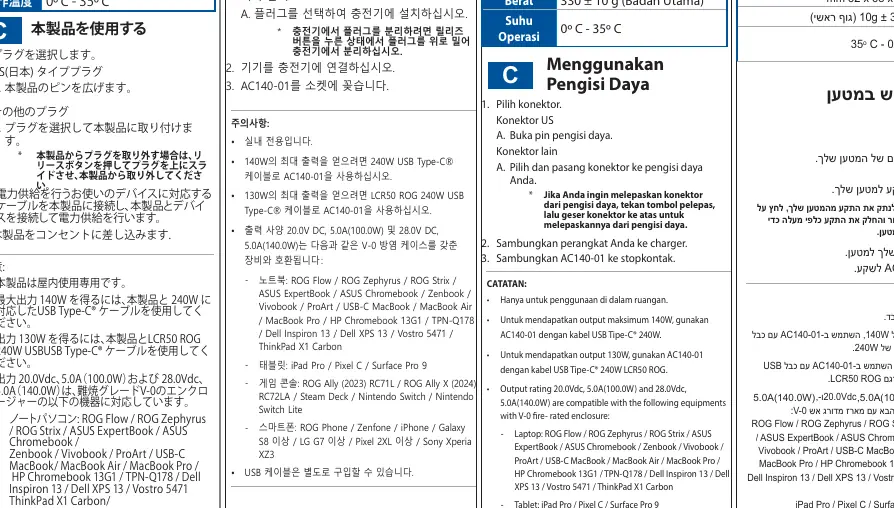
For indoor use only. To achieve the maximum 140W output, use the charger with a 240W USB Type-C cable. For 130W output, use the LCR50 ROG 240W USB Type-C cable. The charger is compatible with various ASUS ROG laptops, tablets like iPad Pro, game consoles such as ROG Ally and Steam Deck, and modern smartphones.
Setup and Operation
To use the charger, select the appropriate plug for your region. For the US plug, unfold the pins. For other regions, select and install the compatible plug onto the charger. Connect your device to the charger using a compatible USB cable, then plug the AC140-01 into a wall socket. To detach a plug, press the release button and slide the plug upward.
Maintenance and Disposal
Keep the device dry and away from extreme temperatures. Do not attempt to disassemble the charger. When disposing of the product, follow local environmental regulations for electronic waste. Do not throw the product in municipal waste; utilize designated recycling or take-back services to ensure proper reuse of parts and materials.
Related manuals
Related manuals from the same brand or category.