User Manual for Aukey Ora 2-in-1 Lens Set
Quick guide for the Aukey Ora 2-in-1 Lens Set. Learn how to assemble the lens, attach it to your smartphone, and use the macro lens feature for optimal photography results.
Quick answers from the manual
Quick answer
- To use the Aukey Ora 2-in-1 Lens Set, screw the lens onto the clip, attach the clip to your phone, and ensure it is centered over the camera lens. For macro shots, unscrew the wide-angle lens attachment. p. 1
Key actions
- Attach lens to clip p. 1
- Mount to phone p. 1
- Use macro lens p. 1
Problems and fixes
Ensure the lens is precisely centered over the phone's camera lens.
p. 1Technical specifications
| Parameter | Value | Meaning | Pages |
|---|---|---|---|
| Macro focus distance | 0.4 - 1 inch | Optimal distance for macro shots | p. 1 |
Where to find it in the PDF
- User Manual p. 1
Table of contents
Manual images
Click an image to enlargeQuick guide from the manual
The Aukey Ora 2-in-1 Lens Set is designed to enhance your smartphone photography. This guide covers the basic assembly and usage of the wide-angle and macro lenses. Ensure the lens is precisely centered over your device's camera for the best results.
Assembly and Usage
Follow these steps to set up and use your lens kit:
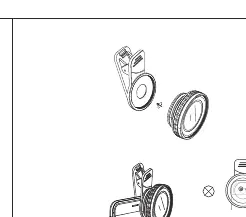
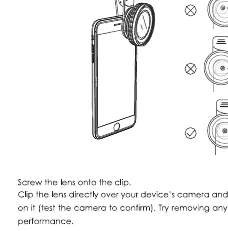
- Attach the lens: Screw the lens onto the provided clip.
- Mount to device: Clip the lens directly onto your device, ensuring it is positioned over the camera lens.
- Check alignment: Test the camera app to confirm the lens is precisely centered.
- Optimize fit: If the clip does not fit securely, try removing your phone case for a better fit and performance.
Using the Macro Lens
To use the macro lens feature:
- Unscrew the wide-angle lens attachment to reveal the macro lens.
- Position the lens 0.4 to 1 inch away from the subject to achieve a clear and detailed image.
Manufacturer information
AUKEY
Practical help
Common problems
Ensure the lens is precisely centered over the phone's camera lens.
Remove the phone case for a better fit and performance.
Before use
- Ensure the lens is screwed onto the clip.
- Clean the phone camera lens.
- Remove the phone case if necessary for a better fit.
- Verify the lens is centered over the camera.

Manual page author
Emily Carter
User documentation editor
Prepares concise manual descriptions and highlights the most useful setup, operation, and maintenance information for readers.