Installation Guide for Aurora 12V 10W LED Driver
Quick installation guide for the Aurora 12V 10W LED Driver. Includes wiring instructions, parallel connection requirements, and lamp compatibility table.
Table of contents
Important Installation Information
Installation must be carried out in accordance with the latest edition of the National Wiring Regulations. If in doubt, consult a qualified electrician.
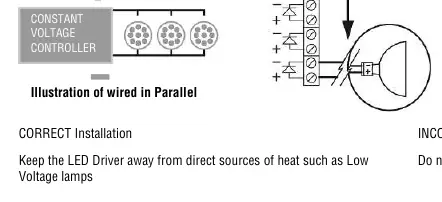
- Parallel Wiring: Constant Voltage LED lamps MUST be wired in parallel.
- Polarity: Observe correct polarity on the 12V DC output for the lamps to operate.
- Connections: Ensure all electrical connections are tight with no loose strands.
Wiring Instructions
Isolate the mains supply before installation or maintenance. Connect the mains supply to the primary input terminals:
- Black/Blue: Neutral
- Red/Brown: Live
- Green & Yellow: Earth
The driver features dual live and neutral terminals to allow for loop-in/loop-out wiring between LED drivers.
Lamp Compatibility
The total wattage of connected lamps must not exceed 10W. You can combine different lamp types.
- MR8 (0.3W): 2 to 33 lamps
- MR11 (0.4W): 1 to 25 lamps
- MR16 (1.2W): 1 to 8 lamps
Installation Best Practices
- Keep the LED driver away from direct sources of heat, such as low voltage lamps.
- Do not fit the LED driver above the luminaire.
Manufacturer information
Aurora Lighting
Practical help
Common problems
Check the polarity of the 12V DC output connection and ensure it matches the lamp requirements.
Ensure all electrical connections are tight with no loose strands.
Keep the LED driver away from direct heat sources like low voltage lamps.
Before use
- Isolate the mains supply before starting installation.
- Verify the total wattage of connected lamps does not exceed 10W.
- Ensure lamps are wired in parallel.
- Check that the polarity of the 12V DC output matches the lamps.

Manual page author
Emily Carter
User documentation editor
Prepares concise manual descriptions and highlights the most useful setup, operation, and maintenance information for readers.