Avantco 193BC Series Refrigerated Display Case Temperature Reset Guide
A quick guide on how to reset and adjust the temperature range for Avantco 193BC series refrigerated display cases, including step-by-step controller configuration.
Table of contents
Quick guide from the manual
This document provides instructions for adjusting the temperature range on Avantco refrigerated display cases, including models 193BC, 193BCT, 193CAC, 193HAC, 193MAC, 193VAC, 193VOA, 360BCC, 360BCDI, 360BCS, 360BCSS, 360CRR, 360GSM, and 360RSD.
How to reset the temperature range
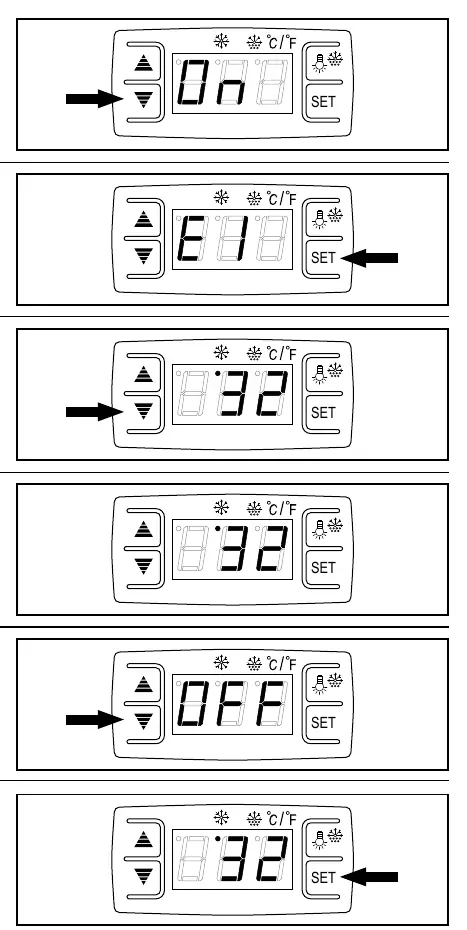
- Press and hold the down arrow button for 10 seconds until the display shows ON. This unlocks the controller for parameter adjustments.
- Press and hold the SET button for 6 seconds until the display flashes E1.
- Use the down arrow button to adjust the value until you reach 32°F.
- Wait for 10 seconds without touching the controller to automatically save the new settings.
- Press and hold the down arrow button for 10 seconds until the display shows OFF. This locks the settings in place.
- Press the SET button again. The display will flash the temperature at which the compressor currently cycles off. Note that the compressor will automatically kick on approximately 7-8 degrees above this set point.
Support
For further assistance, visit the official website at www.AvantcoRefrigeration.com.
Official resources from the manual
Manufacturer information
Avantco Equipment
Practical help
Common problems
Ensure you have performed the 'ON' unlock sequence by holding the down arrow for 10 seconds.
After setting the desired temperature, you must wait 10 seconds without touching the controller to save, then perform the 'OFF' lock sequence.
Before use
- Verify your model is part of the 193BC or 360 series.
- Ensure the unit is powered on.
- Identify the SET button and the down arrow button on the controller panel.

Manual page author
Michael Turner
Technical manual editor
Reviews PDF manuals for structure, safety notes, and practical product details so readers can find the right information quickly.