User Manual for AVerMedia PW310P Webcam
Quick guide for the AVerMedia PW310P webcam. Learn about system requirements, plug-and-play setup, and using CamEngine software for video adjustments and effects.
Table of contents
Manual images
Click an image to enlargeQuick guide from the manual
The AVerMedia PW310P is a plug-and-play USB 2.0 webcam. Simply connect it to your computer's USB port to begin using it. It features a built-in privacy shutter and a 360-degree swivel mount for flexible positioning. The camera is tripod-ready with a standard 1/4 inch thread.
System Requirements
Ensure your computer meets the following requirements for optimal performance:
- Windows 7 or above
- macOS 10.14 or above
- Chrome OS 85.0.4183.131 or above
- Hardware: Intel Core 2 Duo 2.7 GHz or better and 2GB RAM or more
CamEngine Software
CamEngine (Windows) and CamEngine Lite (Mac) allow you to adjust video settings and apply effects.
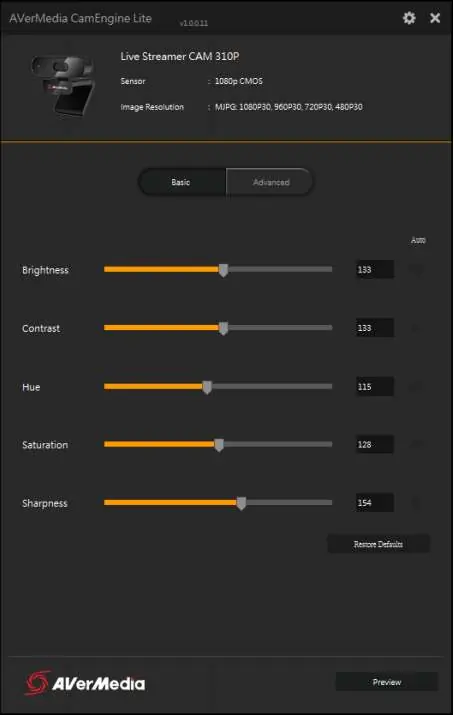
Video Settings
You can adjust parameters such as brightness, contrast, hue, saturation, sharpness, gamma, white balance, backlight compensation, and exposure. There is also an anti-flicker setting.
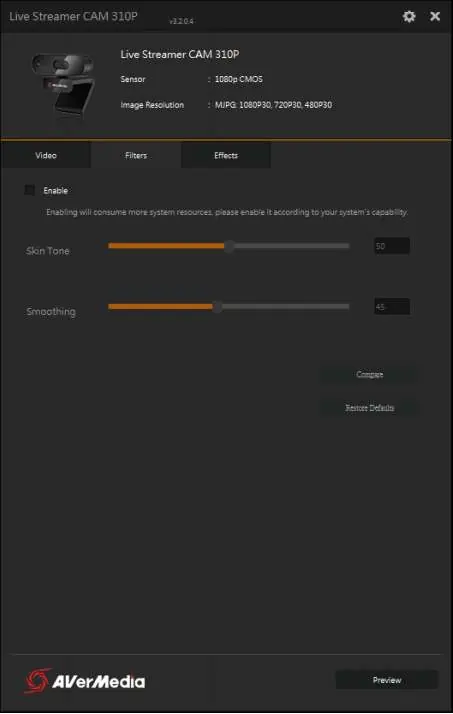
Filters and Effects
The Windows version includes filters like Skin Tone and Smoothing to improve appearance. The Effects tab offers augmented reality effects. Note that these features consume system resources and may slow down your computer; it is recommended to test them before using them in a video call.
Technical Specifications
- Resolution: 1080p at 30 fps
- Focus: Autofocus (7cm to Infinity)
- Field of View: 73 degrees
- Microphone: Omni-directional stereo
- Video Format: MJPEG and YUY2
- Dimensions: 87 x 47.5 x 49 mm
Manufacturer information
AVerMedia Technologies, Inc.
Practical help
Common problems
Filters and effects consume considerable system resources. Test them before using them in a live video call.
Ensure the CamEngine software is installed and running to manage video settings.
Before use
- Check system requirements (Windows 7+, macOS 10.14+, Chrome OS 85+)
- Ensure a USB 2.0 port is available on your computer
- Remove the privacy shutter cover if present
- Connect the webcam to the computer via USB
- Verify that the webcam is selected as the input device in your video conferencing software
Specs in practice
- 1080p/30 fps
- Maximum resolution and frame rate for high-quality video streaming and recording.
- 73° Field of View
- Ideal for capturing one or two people in front of the camera.
- Omni-directional stereo microphones
- Two built-in microphones, one on each side, for a wider and more immersive sound field.
Model compatibility
- Requires USB 2.0 connection
- Software (CamEngine) requires Intel Core 2 Duo 2.7 GHz or better and 2GB RAM

Manual page author
Emily Carter
User documentation editor
Prepares concise manual descriptions and highlights the most useful setup, operation, and maintenance information for readers.