Bailey TOPO 0-70W Electronic Transformer Installation Guide
Quick installation guide for the Bailey TOPO 0-70W electronic transformer. Includes wiring diagrams, technical specifications, safety warnings, and troubleshooting for flickering or noise.
Table of contents
Manual images
Jump to the sectionQuick guide from the manual
The Bailey TOPO 0-70W is a dimmable electronic transformer designed for 12V halogen and LED lamps. This document provides essential installation requirements, wiring instructions, and technical specifications. Installation must be performed by a qualified professional. The device must be installed above insulation in a well-ventilated area away from heat sources.
Safety and Installation

- Risk of electric shock: Always disconnect power before installation, servicing, or removal.
- Qualified installation: Installation must be carried out by a qualified professional.
- Environment: Ensure good air flow and keep away from heat sources. For wet applications, an IP-rated fixture is required.
- Dimmer placement: The dimmer must be installed on the power input wire leading to the transformer.
- Insulation: The transformer must be installed above any insulation material.
Wiring scheme
The transformer features a 2-pole primary terminal (screw diameter 5.2mm) and a 2-pole secondary terminal (screw diameter 3.2mm). The wiring should follow the provided diagram, connecting the power input through the dimmer to the primary side of the transformer, and the 12V lamps to the secondary side.
Technical specifications
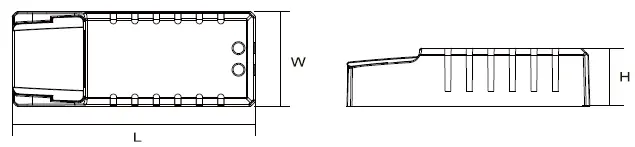
- Input: 220-240V, 50/60Hz, 0.29A
- Output: 11.5V, 6.0A (full load)
- Power range: 0-70W (Halogen), 0-45W (LED)
- Dimming compatibility: R,C & R,L,C
- Dimensions: 113 x 44 x 28 mm
- Weight: 110g
- Secondary cable length: 30-200cm
- Protection: Overload and short-circuit protection included
Troubleshooting
If you experience flickering or noise, it indicates that the transformer is not compatible with the specific LED lamp or LED dimmer being used. Ensure all components are compatible with the transformer's specifications.
Practical help
Common problems
This indicates incompatibility between the transformer and the LED lamp or dimmer. Verify compatibility of all components.
Always disconnect the power supply before performing any installation, maintenance, or removal of the unit.
Before use
- Ensure the installation is performed by a qualified professional.
- Verify that the transformer is installed above insulation.
- Check that the installation location has good air flow and is away from heat sources.
- Confirm that the dimmer is installed on the power input wire.
- Use an IP-rated fixture if the application is in a wet environment.
Specs in practice
- Secondary cable length
- The cable connecting the transformer to the lamps must be between 30cm and 200cm.
- Safety class II
- Double insulated device, does not require a protective earth connection.
Images and diagrams
- The wiring scheme shows the power source (L/N) connected to a dimmer, which then feeds into the primary (PRI) side of the transformer.
- The secondary (SEC) side of the transformer connects directly to the 12V lamp load.
Model compatibility
- Compatible with 12V halogen and LED lamps.
- Compatible with most leading/trailing edge dimmers.

Manual page author
David Miller
Documentation analyst
Organizes user manual content into clear summaries, with attention to model details, product context, and everyday usability.