Power / DC Converters
User Manual for Banggood XY6020L DC Voltage Regulator
Quick guide for the Banggood XY6020L DC Voltage Regulator. Learn how to set voltage and current, configure protection parameters, use data groups, and install the module.
Table of contents
Manual images
Click an image to enlargeQuick guide from the manual
The Banggood XY6020L is a CNC adjustable DC voltage regulator capable of handling up to 1200W. This guide covers the essential operations, including setting output parameters, configuring protection mechanisms, and using the data group function. Always ensure the input voltage is within the 6.0-70V range before operation.
Product overview
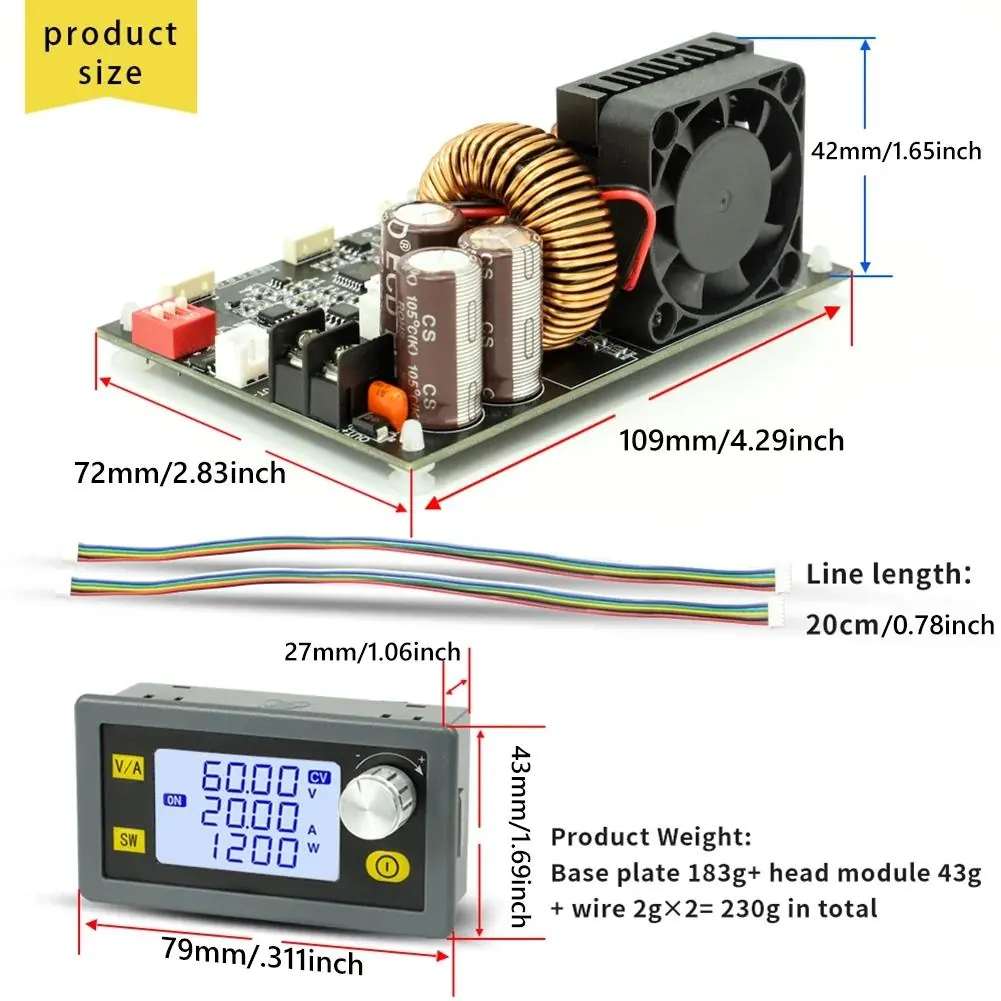
The device consists of a baseboard and a detachable head module. It features a large LCD display for monitoring voltage, current, power, capacity, energy, and time. The unit supports remote control via TTL to 485 or WIFI modules.
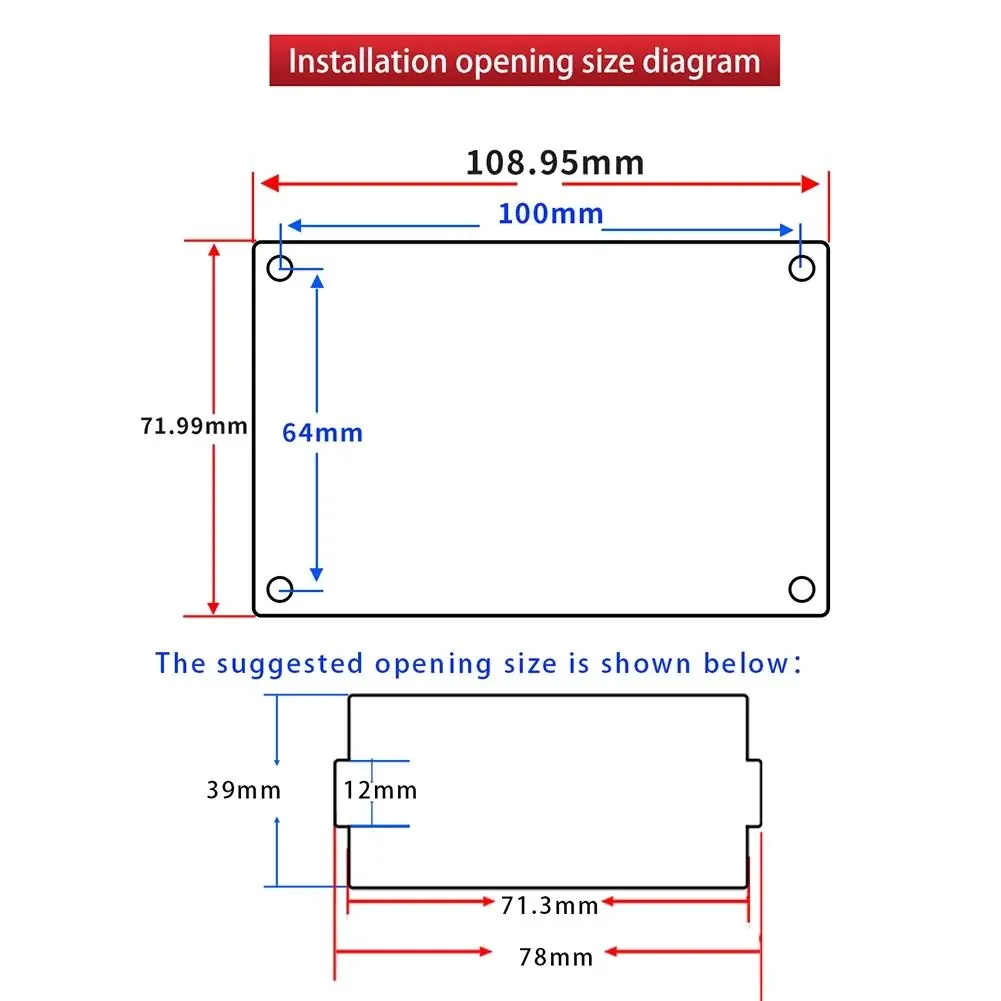
Installation
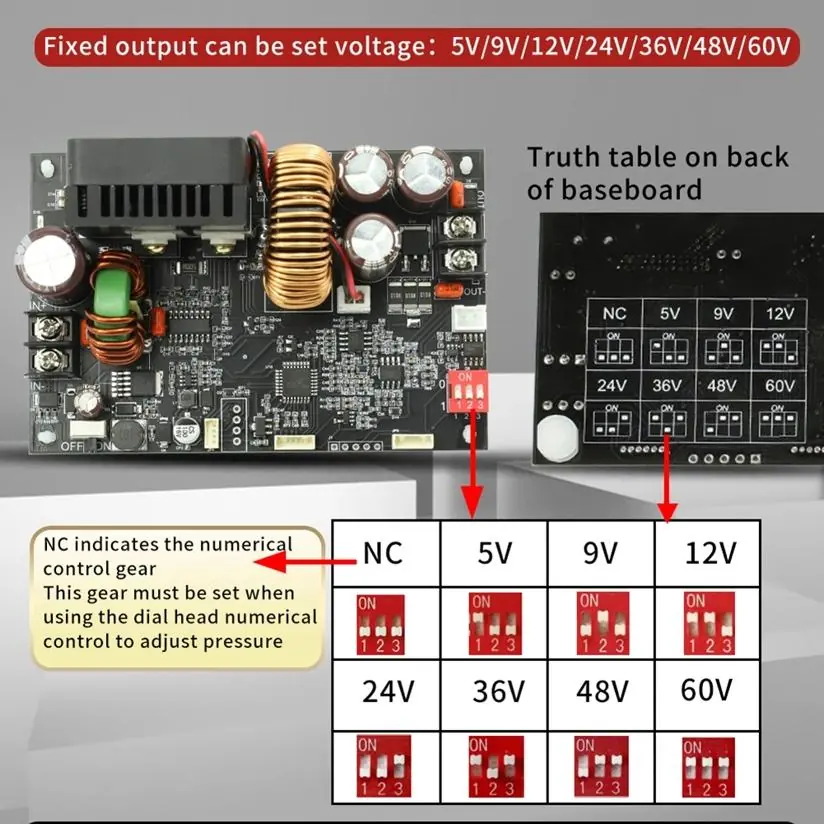
The module is designed for panel mounting. Ensure the installation opening matches the dimensions provided in the technical diagrams. The baseboard includes a dip switch for setting fixed output voltages (5V, 9V, 12V, 24V, 36V, 48V, 60V) when using the baseboard independently.
Operation
Setting voltage and current: In the operation interface, press the V/A button to enter the setting mode. The LCD will display 'SET' and the voltage value will flash. Use the rotary encoder to adjust the voltage. Press V/A again to switch to current setting and adjust using the encoder. Press V/A again to save and exit, or wait 6 seconds for the system to auto-save.
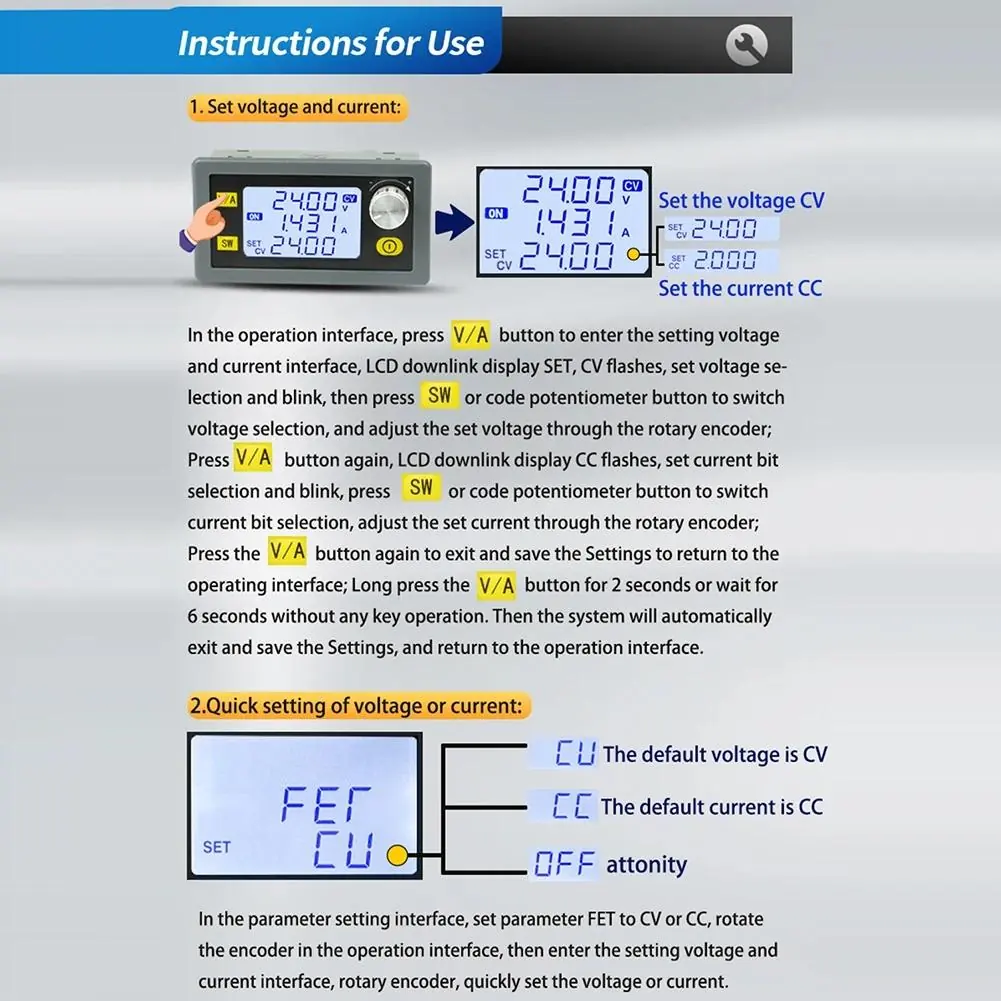
Locking function: To prevent accidental changes, long-press the encoder button for 2 seconds in the operation interface to lock the settings. Long-press again to unlock.
Parameter settings
Hold the SW button for 2 seconds to enter the parameter setting screen. Use the SW button to cycle through parameters such as LUP (Input undervoltage protection), OUP (Output overvoltage protection), OCP (Output overcurrent protection), OPP (Over power protection), OAH (Maximum capacity), OPH (Maximum energy), and OHP (Maximum running time). Use the rotary encoder to adjust values and the ON/OFF button to enable or disable specific functions.
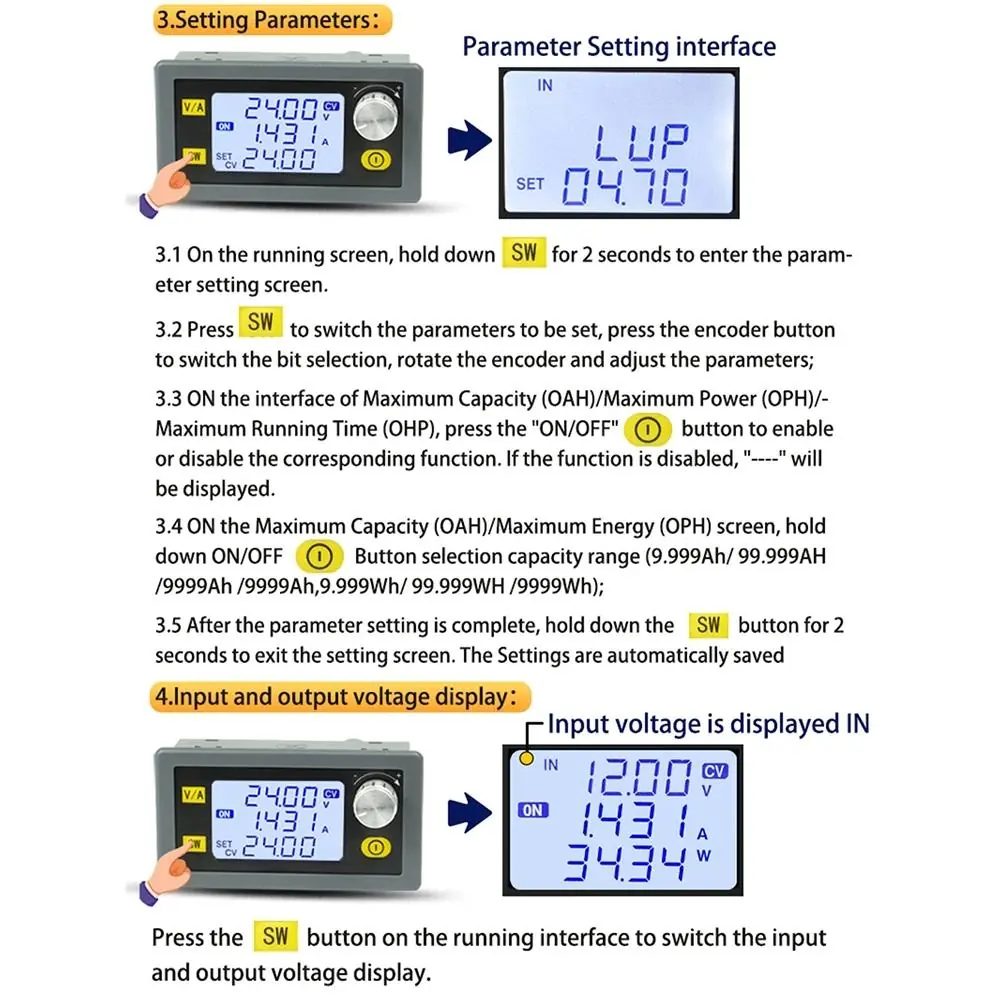
Data group function
The device supports 10 data groups (Cd0-Cd9). Cd0 is the default save location. To access data groups, long-press the V/A key for 2 seconds. Use the V/A key to switch between voltage, current, and data group number, then modify values with the encoder. Long-press V/A to confirm and return to the operation interface.
Protection mechanisms
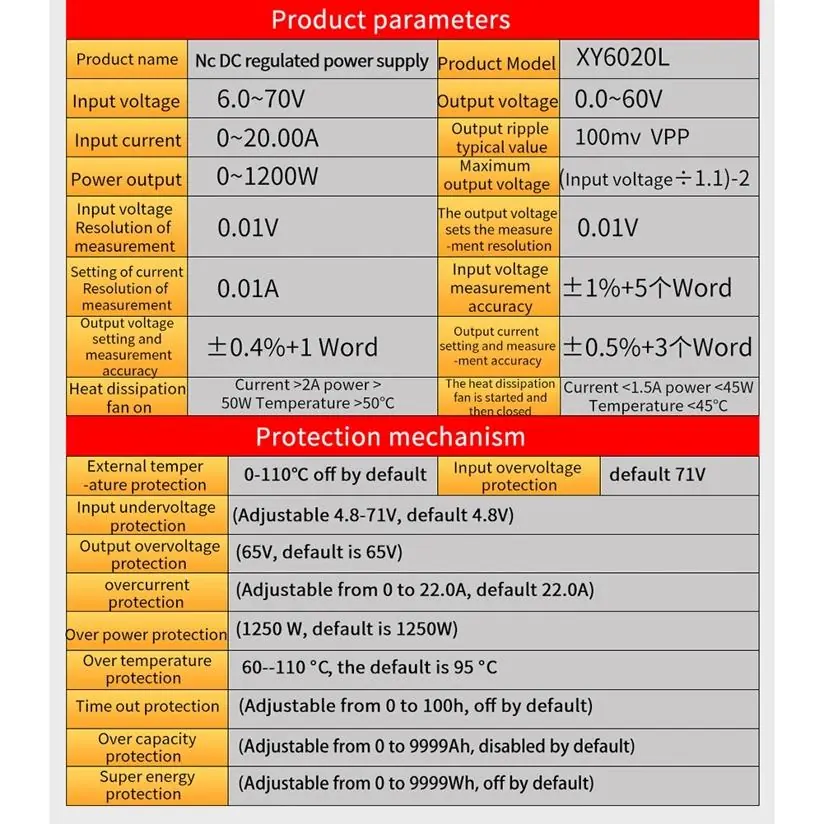
The device includes multiple safety features, including input undervoltage, output overvoltage, output overcurrent, over power, over temperature, timeout, overload, and over energy protection. When a limit is reached, the output will shut down, and the corresponding alarm will flash on the display.
Technical specifications
- Input voltage: 6.0-70V
- Output voltage: 0.0-60V
- Output current: 0-20A
- Output power: 0-1200W
- Cooling: Intelligent temperature-controlled fan (activates based on current >2A, power >50W, or temperature >50°C)
Practical help
Common problems
Output shuts down unexpectedly
Check if OAH, OPH, or OHP protection limits have been reached. If enabled, the device will shut down when the set value is exceeded.
Cannot adjust voltage or current
The locking function may be active. Long-press the encoder button for 2 seconds to unlock.
Fan does not turn on
The fan is temperature-controlled. It activates automatically when current >2A, power >50W, or temperature >50°C.
Before use
- Verify input voltage is within the 6.0-70V DC range.
- Ensure proper wiring to VIN+ and VIN- terminals.
- Check if the fixed output voltage dip switch is set correctly if using the baseboard alone.
- Ensure adequate ventilation for the heat sink.
- Confirm the load does not exceed 1200W.
Specs in practice
- Input Voltage
- 6.0-70V DC operating range.
- Output Voltage
- 0.0-60V DC adjustable range.
- Output Power
- Maximum power output of 1200W.
- Output Current
- 0-20A adjustable range.
Images and diagrams
- The device consists of a baseboard and a detachable head module connected by a cable.
- The dip switch on the baseboard allows for fixed voltage output settings.
Model compatibility
- Supports TTL to 485 or WIFI modules for remote control.

Manual page author
Emily Carter
User documentation editor
Prepares concise manual descriptions and highlights the most useful setup, operation, and maintenance information for readers.