Baseus Bipow Power Bank 20000mAh 20W User Manual
Quick guide for the Baseus Bipow 20000mAh 20W power bank. Includes technical specifications, port layout, usage instructions, and safety features.
Quick answers from the manual
Quick answer
- The Baseus Bipow Power Bank (PPBD20K) is a 20000mAh, 20W portable charger with 2 inputs and 3 outputs, supporting fast charging protocols like PD. p. 2, 3
Key actions
- Verify device compatibility before charging. p. 3
Technical specifications
| Parameter | Value | Meaning | Pages |
|---|---|---|---|
| Capacity | 20000mAh | Total battery capacity | p. 2 |
| Total Output | 5V=3A | Maximum combined output | p. 2 |
Where to find it in the PDF
- Product Specifications p. 2
- Product Diagram p. 3
Table of contents
Quick guide from the manual
The Baseus Bipow Power Bank is a portable charging device with a 20000mAh capacity and 20W output. It features a digital display and supports simultaneous charging of up to three devices. Before use, ensure your device's charging voltage is compatible with the power bank's specifications.
Product description
This power bank is equipped with two inputs and three outputs. It includes built-in protections against overvoltage, overcurrent, overheating, and short circuits to ensure device safety. It supports various fast charging protocols, including iP 12 20W PD.
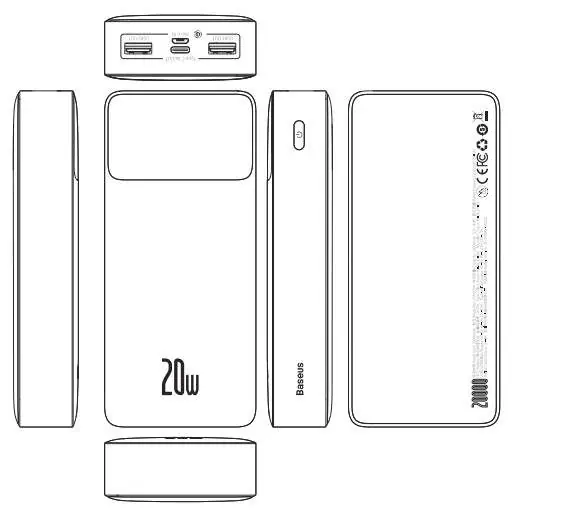
Technical specifications
- Model: PPBD20K
- Battery Type: Polymer lithium battery
- Capacity: 20000mAh / 3.7V (74Wh)
- Rated Capacity: 12000mAh (5V=3A)
- Energy Conversion Factor: ≥ 75%
- Micro Input: 5V=2A, 9V=2A
- Type-C Input: 5V=3A, 9V=2A
- Type-C Output: 5V=3A, 9V=2.22A, 12V=1.5A
- USB1/USB2 Output: 5V=3A, 9V=2A, 12V=1.5A
- Total Output: 5V=3A
- Dimensions: 153 x 68.8 x 29.5mm
- Weight: 452g
Package contents
- Power Bank
- Instructions
- Warranty card
- Charging cable
Usage instructions
To charge your phone or other digital devices:
- Verify that the charging voltage of your digital device is compatible with the parameters of the Bipow power bank.
- Connect your device to the power bank using a suitable cable.
Manufacturer information
Baseus
Practical help
Common problems
Ensure the charging voltage of your digital device is compatible with the power bank's output parameters.
Before use
- Check device compatibility with power bank output
- Ensure you have a compatible charging cable
- Verify power bank charge level via digital display

Manual page author
David Miller
Documentation analyst
Organizes user manual content into clear summaries, with attention to model details, product context, and everyday usability.