Home Appliances / Vacuum Cleaners
Baseus UnionJoy 14-Port Type-C HUB Adapter
A comprehensive 14-in-1 multifunctional Type-C docking station designed for high-speed data transfer, multi-screen display expansion, and efficient power delivery.
Table of contents
Product Overview
The Baseus UnionJoy 14-Port Type-C HUB is a versatile docking station designed to expand the connectivity of your laptop. It supports multi-screen display, high-speed data transfer, and power delivery, making it an essential tool for productivity.
Technical Specifications
- USB 3.0: Up to 5Gbps data transfer.
- USB 2.0: Up to 480Mbps data transfer.
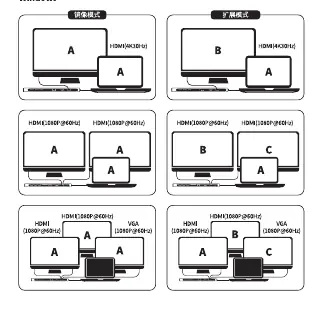
- HDMI: Supports 4K@30Hz resolution.
- VGA: Supports 1080P@60Hz resolution.
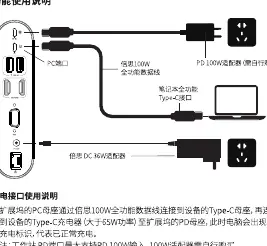
- Type-C PD: Supports up to 100W power input.
- RJ45: Supports 1000Mbps wired network connection.
- Audio: 3.5mm jack for headphones and speakers.
Setup and Operation
To use the HUB, connect it to your laptop's full-featured Type-C port using the provided cable. For power delivery, connect a compatible 65W or higher charger to the PD port on the HUB. The device supports both mirroring and extension modes on Windows and macOS. Ensure your laptop's Type-C port supports DP Alt Mode for video output functionality.
Safety and Maintenance
Keep the device away from fire sources. Do not attempt to disassemble or repair the unit yourself. It is normal for the HUB to generate heat during operation due to its high-performance internal chip; the metal casing is designed to dissipate this heat effectively. If you experience connectivity issues, ensure all cables are securely connected and that your device meets the necessary technical requirements.
Troubleshooting
- External Hard Drive Not Detected: Check the drive in your system's file manager (This PC or Finder).
- Slow Response: If mouse or keyboard response is slow, ensure the HUB is connected to the included 36W DC power adapter to provide sufficient voltage.
- Resolution Issues: Ensure both your laptop and monitor support the desired resolution and that you are using high-quality cables.
- NTFS Drives on Mac: macOS supports read-only for NTFS. Format the drive to ExFAT to enable read/write capabilities.
Disposal
This product contains electronic components and must not be disposed of with regular household waste. Please recycle it at an authorized electronic waste collection facility in accordance with local regulations.
Related manuals
Related manuals from the same brand or category.