Home Appliances / Dryers
Beldray 1500W Smart Ceramic Core Radiator
Efficient and slimline 1500W smart ceramic core radiator with Wi-Fi control, 7-day timer, and advanced safety features for domestic heating.
Table of contents
Product Overview
The Beldray 1500W Smart Ceramic Core Radiator is a slimline, energy-efficient heating solution designed for domestic use in well-insulated spaces. It features a digital thermostat, 7-day programmable timer, and Wi-Fi connectivity, allowing for remote control via a smartphone app. The unit is portable with 360-degree castor wheels or can be wall-mounted using the included brackets.
Safety Instructions
Always follow basic safety precautions when using electrical appliances. Keep children under 3 years old away from the unit unless supervised. Do not cover the radiator to prevent overheating. Maintain a distance of at least 1 metre from flammable materials like furniture or curtains. Never operate the unit with wet hands or near water sources such as baths or showers. The radiator is equipped with a thermal cut-out device that automatically switches off the unit if it begins to overheat.
Getting Started and Installation
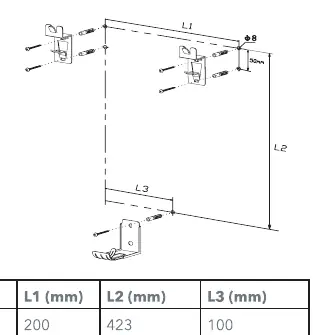
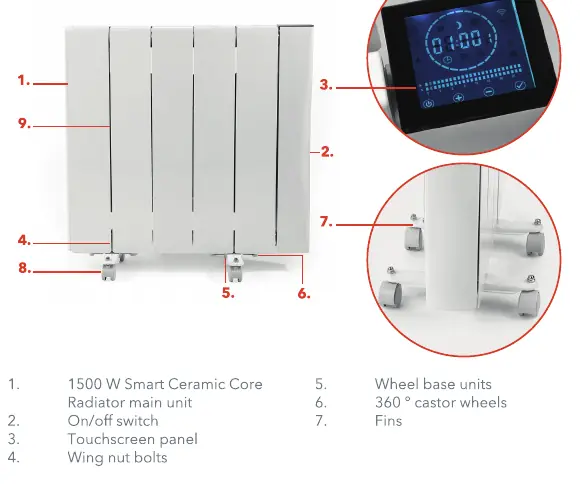
The radiator can be used as a portable unit by attaching the provided castor wheels to the base using the supplied wing nut bolts. For wall mounting, ensure the wall is strong and heat-resistant. Use the provided brackets and screws, ensuring a minimum clearance of 150 cm from the floor and 200 mm on all sides for proper air circulation. Always ensure the unit is unplugged before assembly or maintenance.
Operation and Modes
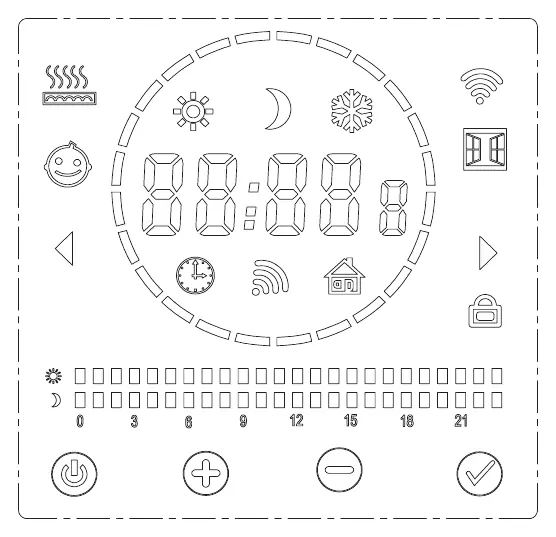
The radiator features a touch-screen panel for local control. It offers several modes: Comfort, Economic, Frost Prevention, Sensor, and Timer mode. The sensor mode detects presence to adjust heating automatically, while the open window function detects temperature drops to save energy. Users can program daily schedules via the touch screen or the smartphone app. To enable the control panel lock, press and hold the plus and minus buttons simultaneously.
Wi-Fi Connectivity
The radiator can be connected to the Tuya Smart app. Enable Wi-Fi on the radiator via the internal set-up menu, then follow the pairing instructions in the app. This allows for remote temperature adjustments, mode selection, and scheduling.
Care and Maintenance
Always unplug the radiator and allow it to cool completely before cleaning. Wipe the exterior with a soft, damp cloth. Do not use abrasive chemicals or scourers. Regularly check the power cord and plug for damage. If the unit malfunctions, do not attempt repairs yourself; contact a qualified electrician.
Troubleshooting
If the radiator fails to operate, check the power supply, ensure the thermal cut-out has not been triggered, and verify the fuse. If the unit does not connect to the app, ensure the Wi-Fi signal is strong and the smartphone is on the same network.
Related manuals
Related manuals from the same brand or category.
Home Appliances / Range Hoods
Forte Maya Cooker Hood
ForteHome Appliances / Range Hoods
Forte Cortivo Range Hood
ForteHome Appliances / Range Hoods
Forte Cortivoisland Range Hood
ForteHome Appliances / Range Hoods