Electronics / Headphones Earbuds
Blackview AirBuds 1/AirBuds 2 TWS Bluetooth Headset User Manual
Comprehensive user guide for Blackview AirBuds 1 and AirBuds 2 TWS Bluetooth headsets, covering setup, operation, maintenance, and troubleshooting.
Table of contents
Product Overview
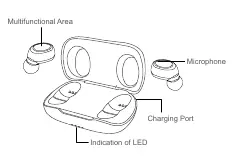
The Blackview AirBuds 1 and AirBuds 2 are True Wireless Stereo (TWS) Bluetooth headsets designed for convenience and high-quality audio. The system includes two wireless earbuds and a charging case. Each earbud features a multifunctional area for touch controls, a built-in microphone, and charging contacts. The charging case provides power to the earbuds and features an LED indicator to show the charging status of both the case and the earbuds.
Device Connectivity
To pair your earbuds for the first time, open the charging case cover. The earbuds will automatically turn on and enter pairing mode, indicated by the red and blue lights on the right earbud flashing alternately. On your mobile device, enable Bluetooth, search for 'AirBuds 1', and select it to connect. Once successfully paired, you will hear a 'Connected' voice prompt. For subsequent uses, the earbuds will automatically power on and connect to your device as soon as they are removed from the charging case.
Operation Method
The earbuds support various touch-based controls. A single click on either earbud plays or pauses audio. Double-clicking the left earbud plays the previous track, while double-clicking the right earbud skips to the next track. Volume can be adjusted by long-pressing the left earbud to decrease volume or the right earbud to increase it. Incoming calls can be answered or ended with a double-click on either side, and rejected by long-pressing for two seconds. Triple-clicking either earbud activates the voice assistant.
Maintenance and Safety
To ensure the longevity of your device, keep the earbuds and charging case dry and away from damp environments. Avoid using the product during intense physical activities where excessive sweat might infiltrate the internal components. Do not expose the device to direct sunlight, high temperatures, or intense vibrations. Clean the product with a soft cloth; avoid using corrosive detergents. Always use a standard charging cable and adapter to prevent electrical damage. Do not attempt to disassemble the product yourself, as this may void your warranty and cause safety hazards.
Manufacturer information
Blackview
Practical help
Common problems
Headset cannot be turned on
Place in the charging case and charge for at least 1 hour.
Phone cannot find the earbuds
Ensure they are in pairing mode (tap 5 times) or clear old pairing data from your phone.
No sound from speakers
Check volume levels on both the phone and the earbuds, or re-pair the Bluetooth connection.
Earbuds not disconnecting in the case
Ensure they are seated correctly so the charging lights activate, or charge the case itself.
Before use
- Ensure the charging case is fully charged
- Verify Bluetooth is enabled on your smartphone
- Remove earbuds from the case to initiate auto-power on
- Check that the indicator light is flashing for pairing mode
Specs in practice
- Bluetooth Version 5.0
- Ensures stable wireless connection and efficient power consumption.
- Battery Capacity (Case)
- 390mAh capacity for multiple recharges of the earbuds.
- Effective Distance
- Up to 10 meters range without significant obstacles.
- Charging Time
- Less than 2 hours for both earbuds and the charging case.
Images and diagrams
- The multifunctional area is located on the outer surface of each earbud for touch control.
- The charging port is located on the case for Type-C cable connection.
- LED indicators on the case show charging status and battery levels.
- The earbuds should be placed in the case with the correct orientation to ensure charging contacts meet.
Model compatibility
- Compatible with most Bluetooth-enabled smartphones and tablets.
- Requires standard Type-C charging cable and adapter.

Manual page author
Michael Turner
Technical manual editor
Reviews PDF manuals for structure, safety notes, and practical product details so readers can find the right information quickly.