Automotive / Parts Accessories
Blaupunkt HEAVY DUTY Series 12V Car Radio User Manual
Quick guide for the Blaupunkt HEAVY DUTY Series 12V car radio, covering controls, installation, Bluetooth setup, and troubleshooting.
Table of contents
Manual images
Jump to the sectionQuick guide from the manual
This document provides essential operating instructions for the Blaupunkt HEAVY DUTY Series 12V car radio. It covers basic controls, installation, Bluetooth connectivity, and troubleshooting steps. Please note that some features may vary depending on your specific model.
Device Description and Controls
The car radio features a front panel with a menu button, volume/power knob, source selection, station buttons, and a display. It supports various audio sources including FM/AM radio, DAB/DAB+ (model-dependent), USB, CD (model-dependent), iPod/iPhone, and AUX. Bluetooth connectivity allows for hands-free calling and audio streaming.
Installation and Connections
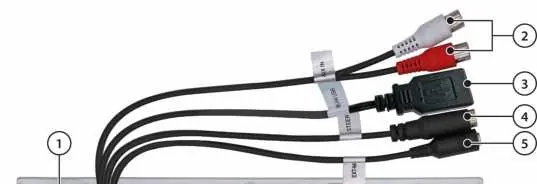
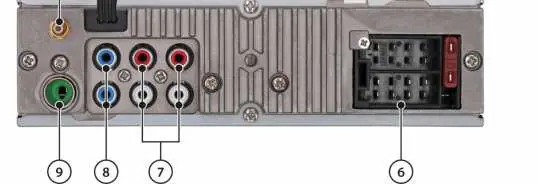
Installation should only be performed by experienced professionals. Ensure the vehicle battery is disconnected before starting. The radio must be installed in a DIN slot. Proper connection of ignition (ACC) and permanent power (BATT) is critical to prevent battery drain. The rear panel includes connections for antennas, USB, steering wheel remote control (SWC), external microphone, and pre-amp outputs.
Operation and Settings
The radio is controlled via the front panel buttons and knobs. The menu allows for extensive customization, including audio settings (Bass, Treble, Balance, Fader, Equalizer), display settings (brightness, color), and Bluetooth configuration. Traffic announcement priority (TRAF) and regional settings (REG) can also be managed in the menu.
Bluetooth Connectivity
To connect a device, enable Bluetooth on your phone and search for the car radio. Once connected, you can use the hands-free system for calls and stream music via A2DP/AVRCP. The radio can store up to 5 paired devices.
Troubleshooting
If you encounter issues, check the connections first. Common problems include the radio not turning on (check ignition/permanent power), poor radio reception (check antenna), or Bluetooth connection issues (reset via NORMSET or delete/re-pair the device). If problems persist, contact Blaupunkt service with your software version.
Manufacturer information
Blaupunkt
Practical help
Common problems
Radio does not turn on or turns off after 1 hour
Check if the ignition plus (ACC) is correctly connected and active.
Display flickers or radio turns off at high volume
Check the cross-section of the power supply cable.
Bluetooth connection issues or phonebook not displayed
Ensure the radio is correctly connected to both ACC and BATT. Reset the radio via NORMSET or delete the radio from your phone's Bluetooth list and re-pair.
Radio reception is poor
Check the antenna installation and ensure a phantom power adapter is used if required.
Before use
- Disconnect the vehicle battery before installation.
- Ensure the radio is installed in a DIN slot.
- Verify correct wiring of ignition (ACC) and permanent power (BATT).
- Remove any transport protection screws from the CD/DVD drive.
- Check antenna compatibility and installation.
Specs in practice
- FM Frequency Range
- 87.5–108 MHz
- DAB Frequency Range
- 174.928–239.200 MHz (Channel 5A-13F)
- Operating Voltage
- 12V or 24V (model-dependent)
- Speaker Impedance
- ≥ 4 Ohm/channel
Images and diagrams
- 1: FM/AM Antenna
- 2: Pre-amp outputs (RR, FR, RL, FL)
- 3: Rear USB port
- 4: Steering Wheel Control (SWC) input
- 5: External microphone input
Model compatibility
- Supports newer Apple devices with Lightning or USB-C (iAP2 protocol).
- Not compatible with older Apple devices using 30-pin connectors (iAP1).
- Does not support CD changers or interfaces compatible with older Blaupunkt radios.

Manual page author
Emily Carter
User documentation editor
Prepares concise manual descriptions and highlights the most useful setup, operation, and maintenance information for readers.