boAt Stone 352 Pro 14W Bluetooth Speaker
Comprehensive user guide for the boAt Stone 352 Pro portable Bluetooth speaker, covering setup, TWS pairing, playback modes, and maintenance.
Table of contents
Product Overview
The boAt Stone 352 Pro is a portable 14W Bluetooth speaker designed for high-quality audio performance. It features multiple connectivity options including Bluetooth, TF card, and AUX input. The device is built with an IPX5 water resistance rating, making it suitable for various environments.
Getting Started
To power on the speaker, long-press the power button. The device will automatically enter Bluetooth pairing mode, indicated by a flashing white LED. Select Stone 352 Pro in your smartphone's Bluetooth settings to complete the connection. For TWS functionality, power on two units and long-press the play/pause button on one of them to link the speakers together.
Operating Instructions
- Bluetooth: Automatically reconnects to the last paired device.
- TF Card: Insert a card into the dedicated slot to switch to playback mode automatically.
- AUX Mode: Connect an external device using an AUX cable and select the mode via the M button.
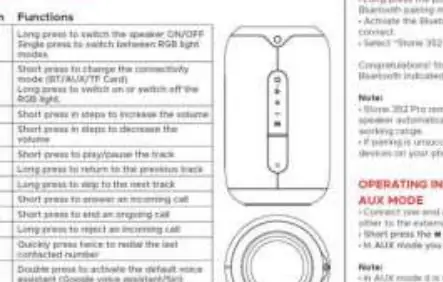
- Controls: Use the M button to switch modes or toggle RGB lights. Use the plus and minus buttons to adjust volume, and the play/pause button to manage tracks and calls.
Charging and Maintenance
Charge the device using a 5V/2A adapter and the provided cable. The LED indicator remains red during charging and turns off when the battery is fully charged. To ensure longevity, avoid exposing the speaker to extreme temperatures, direct heat sources, or water submersion. Clean the exterior with a soft cloth only.
Safety and Troubleshooting
Do not disassemble or modify the product. If the speaker becomes unresponsive, use a pointed object to press the reset button located near the TF card slot. This will restore the device to its factory settings. Always use the recommended charging specifications to prevent battery damage.