BRAUN DigiFrame 1096 16GB Digital Photo Frame
User manual for the BRAUN DigiFrame 1096 16GB digital photo frame, covering setup, file management, and settings.
Table of contents
Product Overview
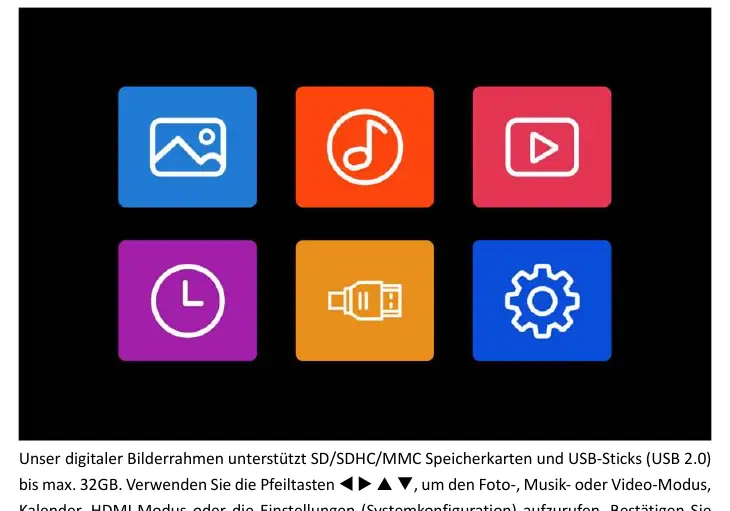
The BRAUN DigiFrame 1096 16GB is a versatile digital photo frame designed to display your favorite memories. It features a 16GB internal memory and supports external storage via SD/SDHC/MMC cards and USB 2.0 sticks up to 32GB. The device includes integrated stereo speakers, a headphone jack, and an HDMI-IN port for external connectivity.
Getting Started
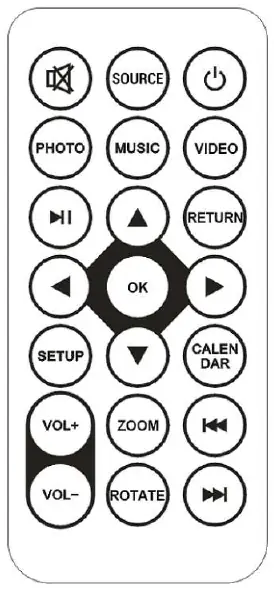
To begin, insert your memory card or USB stick containing your media files. Use the included remote control or the buttons on the back of the frame to navigate the main menu. You can access photo, music, and video modes, as well as a calendar and system settings. Ensure your files are stored in the root directory of your storage device for optimal performance.
Operation
- Photo Mode: Select 'Photo' from the main menu to view your images. You can choose between the internal memory, SD card, or USB stick. Use the 'Return' button to access thumbnail mode for easier selection.
- Music and Video Modes: Similar to photo mode, select the respective icon to browse and play your audio or video files.
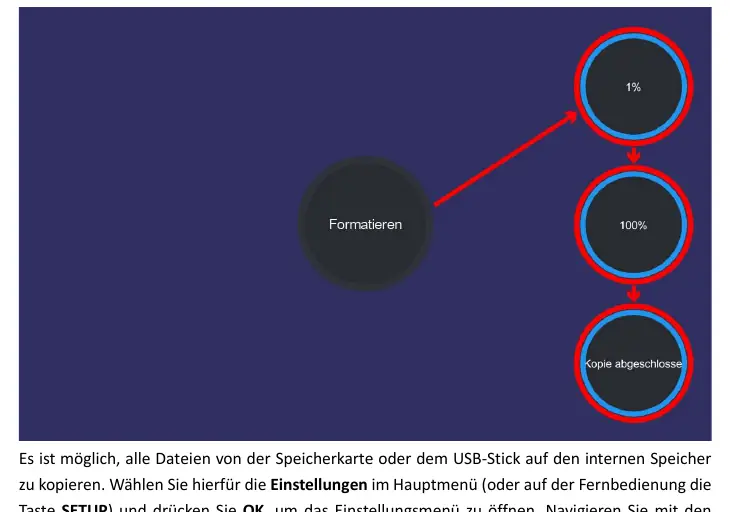
- Copy Function: You can copy files from external storage to the internal memory. Navigate to 'Settings' > 'System Setup' > 'Copy All' and set it to 'On'. After inserting your storage device, the copying process will start automatically. Remember to turn this feature 'Off' once finished.
- Calendar: Access the calendar function directly from the main menu to view dates and times.
Settings and Maintenance
The settings menu allows you to customize your experience, including display modes, slideshow transition times, background music, and system configurations like language, brightness, contrast, and saturation. You can also set automatic power-on/off times. To reset the device to factory defaults, use the 'Reset Default Settings' option in the system menu.
Troubleshooting and Support
If you encounter issues, ensure your files are in supported formats (JPEG, BMP, PNG for photos; MP3, AAC, etc., for audio; MP4, MPEG, etc., for video). The device supports up to 3,000 files; exceeding this limit will trigger an error message. For further assistance, please contact BRAUN technical support before returning the device.

Manual page author
David Miller
Documentation analyst
Organizes user manual content into clear summaries, with attention to model details, product context, and everyday usability.