User Manual for CADDXFPV ECLIPSE 006SL Thermal Camera
Quick guide for the CADDXFPV ECLIPSE 006SL thermal camera. Includes connection diagrams, technical specifications, and installation dimensions.
Table of contents
Manual images
Click an image to enlargeQuick guide from the manual
The CADDXFPV ECLIPSE 006SL is a thermal camera designed for FPV applications. This guide covers the essential wiring connections, technical specifications, and physical dimensions required for installation.
Connection
The camera requires a 3-wire connection to function correctly:
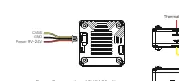
- CVBS: Connect to the analog VTX "CAMERA" port or "CVBS IN" port.
- GND: Ground connection.
- Power: Connect to a power source between 9V and 24V.
Note: Power consumption is rated at 12V@120mAh.
Specifications
- Detector type: Uncooled Vanadium Oxide
- Resolution: 640x512@12um
- Wavelength Range: 8~14um
- Lens: F1.0/9.1mm/48.3(H)*38.6(V)*66(D)
- Frame Rate: 25/50 fps
- Power consumption: <1.5w
- Output: PAL
- Supply Voltage: 9V~24V
- Operating Temperature: -20°C~60°C
- Interface: Analog Interface: CVBS
- Latency: Average Latency 20ms
- Image Quality: Allmage Enhancement
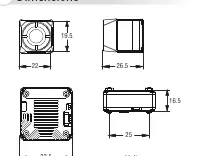
Dimensions
The camera dimensions are provided in millimeters (mm) to assist with mounting and integration into your drone or FPV setup.
Support
For further assistance, you can contact CADDXFPV support via email at [email protected] or visit their website at https://www.caddxfpv.com for the latest updates.
Official resources from the manual
Practical help
Common problems
Ensure the CVBS wire is connected to the analog VTX 'CAMERA' or 'CVBS IN' port.
Verify the input voltage is within the 9V-24V range.
Before use
- Verify power supply is between 9V and 24V.
- Ensure the CVBS signal wire is connected to the correct VTX port.
- Check that the ground (GND) wire is properly connected.

Manual page author
David Miller
Documentation analyst
Organizes user manual content into clear summaries, with attention to model details, product context, and everyday usability.