CAME HENDRIX 1 Remote Control User Guide
Quick guide for the CAME HENDRIX 1 remote control, covering initial programming, transmitter duplication, battery replacement, and factory reset procedures.
Table of contents
Quick guide from the manual
The CAME HENDRIX 1 is a 24-bit mono-channel transmitter designed for radio control of awnings, shutters, and blinds compatible with the KLT system. This guide provides essential procedures for initial setup, cloning, and maintenance.
Device Description
The transmitter features four main buttons: Up, Stop, Down, and Programming (P2). It includes a wall-mount support and operates on a single frequency. The LED indicator lights up during transmission.
Memorizing the First Transmitter
Perform this procedure within one minute of powering on the receiver:
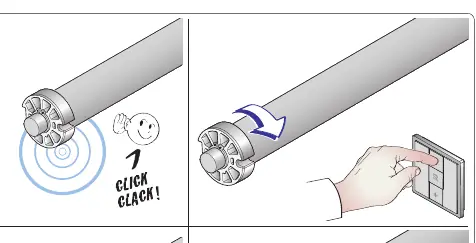
- Option 1 (P2 P2 UP): The UP key controls the motor in a clockwise direction.
- Option 2 (P2 P2 DOWN): The UP key controls the motor in a counter-clockwise direction.
Activating a New Transmitter
To add a new transmitter using an existing one:
- Press P2 twice on the already memorized transmitter.
- Press P2 on the new transmitter.
Duplicating KLT Transmitters
- Simultaneously press the UP and DOWN keys on the new transmitter until the LED flashes faster.
- Within 10 seconds, place the active transmitter to be duplicated next to the new one.
- Press any button on the active transmitter for a few seconds. The LED will flash four times upon successful memorization.
Duplicating 12 or 24-bit Transmitters
- Use selection keys to choose the channel.
- Simultaneously press STOP and DOWN on the Hendrix transmitter until the LED flashes faster.
- Press the button you wish to activate (LED turns on).
- Within 10 seconds, place the 12/24-bit transmitter next to the Hendrix and press the button to be duplicated. The LED will flash three times upon success.
- Repeat for each button.
Factory Reset
- Remove the battery.
- Simultaneously press and hold the Up, Stop, and Down keys.
- Re-insert the battery while holding the keys.
- Release the keys once the LED stops flashing.
Battery Replacement
Use only CR2430 3V batteries. Replace by removing the old battery and inserting the new one, ensuring correct polarity. Dispose of used batteries according to local regulations.
Safety Warnings
- Keep the transmitter out of reach of children to prevent accidental operation.
- Avoid contact with water.
- Risk of explosion if the battery is replaced incorrectly.
Manufacturer information
CAME S.p.A.
Practical help
Common problems
Check if the battery is depleted or if the transmitter needs to be re-memorized.
Ensure you are pressing the correct button combinations (UP+DOWN for KLT, STOP+DOWN for 12/24-bit) and that you are within the 10-second window.
Perform the memorization procedure again, choosing the alternative option (P2 P2 UP vs P2 P2 DOWN) to reverse the direction.
Before use
- Ensure the receiver is powered on.
- Verify the battery (CR2430 3V) is correctly installed.
- Confirm compatibility with your KLT system or 12/24-bit transmitter.
- Keep the transmitter away from water and children.
Specs in practice
- 433.92 MHz / 868.35 MHz
- Operating radio frequencies for signal transmission.
Images and diagrams
- Section A: Technical specs, battery type, and operating range (50-150m).
- Section C: Initial memorization steps using P2 button.
- Section E: Duplication process between KLT transmitters.
- Section F: Duplication process for 12/24-bit transmitters.
- Section G: Factory reset procedure using battery removal and key combinations.
Model compatibility
- Compatible with KLT system series.
- Compatible with 12-bit and 24-bit fixed code transmitters.

Manual page author
Michael Turner
Technical manual editor
Reviews PDF manuals for structure, safety notes, and practical product details so readers can find the right information quickly.