Home Appliances / Washing Machines
Candy 18M R54 DC CLASS E Basic Refrigerator User Guide
Quick start guide for the Candy 18M R54 DC CLASS E Basic refrigerator, covering installation, control panel operation, temperature settings, and troubleshooting.
Table of contents
Quick guide from the manual
This document provides essential instructions for the Candy 18M R54 DC CLASS E Basic refrigerator. It covers initial setup, control panel usage, temperature adjustments, and maintenance procedures. For optimal energy efficiency, ensure all drawers, food boxes, and shelves are correctly positioned and the fan is turned off.
Product description
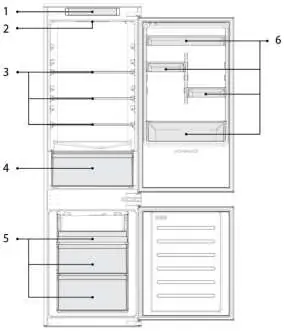
The refrigerator features a control panel (1), interior lighting (2), adjustable shelves (3), a crisper drawer (4), freezer boxes (5), and door racks (6).
Installation and space requirements
Ensure the refrigerator door can open fully (140°). Maintain a minimum distance of 50 mm between the side walls of the appliance and any adjacent furniture or walls to ensure proper ventilation and door operation.
Control panel and operation
The control panel allows you to switch the appliance on/off, adjust cooling levels, and activate special functions. Upon plugging in, the unit automatically sets the temperature to level 2. Wait 2-3 hours before storing food. Use the Mode key to cycle through cooling levels (1-4) or activate Super Cool and Eco modes.
Special functions
- Fine Tuning: Allows temperature adjustment in sublevels. Press the Mode key for 8 seconds to enter this mode.
- Super Cool: Accelerates cooling for large amounts of fresh food. Automatically turns off after 24 hours.
- Eco mode: Optimizes performance for the best combination of fridge and freezer temperatures.
Defrosting and maintenance
If frost in the freezer exceeds 3 mm, defrost the unit. Switch off, remove food, leave the door open, and collect water at the bottom. Dry thoroughly before restarting.
Troubleshooting
If the appliance does not cool, check if Demo mode is active. For noise issues, ensure the unit is level. If the interior light does not turn on, check the power connection and Holiday mode settings.
Manufacturer information
Candy
Practical help
Common problems
Inside light does not turn on
Check power supply, ensure the appliance is not switched off, and deactivate Holiday mode.
Internal temperature not cold enough
Ensure doors are closed, avoid frequent opening, check temperature settings, and ensure the unit is not overfilled.
Motor runs continuously
Check if doors are closed properly, avoid frequent opening, and ensure ambient temperature is within specifications.
Strong ice/frost in freezer
Ensure food is well-packaged, doors/drawers are closed tightly, and gaskets are clean and undamaged.
Before use
- Check that the power cable is properly plugged in.
- Wait 2-3 hours after plugging in before storing food.
- Ensure the unit is placed on level ground.
- Maintain at least 50 mm clearance from side walls.
- Ensure the unit is not in Demo mode.
Specs in practice
- Cooling Level 1
- Highest temperature setting.
- Cooling Level 4
- Lowest temperature setting.
Images and diagrams
- 1: Control Panel
- 5: Freezer Boxes
Model compatibility
- Compatible with the hOn App for extra content and inventory management.

Manual page author
David Miller
Documentation analyst
Organizes user manual content into clear summaries, with attention to model details, product context, and everyday usability.