Canon EOS 2000D User Manual
Quick guide for the Canon EOS 2000D digital SLR camera. Includes setup checklist, key features, and initial usage instructions.
Quick answers from the manual
Quick answer
- The Canon EOS 2000D is a digital SLR camera featuring a 24.1MP CMOS sensor, DIGIC 4+ processor, and Wi-Fi/NFC connectivity. p. 2
Key actions
- Check package contents before starting p. 3
- Read safety and handling instructions p. 2
Technical specifications
| Parameter | Value | Meaning | Pages |
|---|---|---|---|
| Sensor | 24.1 MP | Effective resolution CMOS sensor | p. 2 |
| Processor | DIGIC 4+ | Image processor | p. 2 |
Where to find it in the PDF
- Introduction p. 2
- Checklist p. 3
Table of contents
Quick guide from the manual
The Canon EOS 2000D is a digital SLR camera. Before using the device, ensure all items are present in the package and read the safety and handling instructions provided in the full manual.
Product overview
The camera features a 24.1 effective megapixel CMOS sensor, DIGIC 4+ processor, and a 9-point autofocus system. It supports Full HD video recording and includes built-in Wi-Fi and NFC for wireless communication.
Included items
Check the package for the following items:
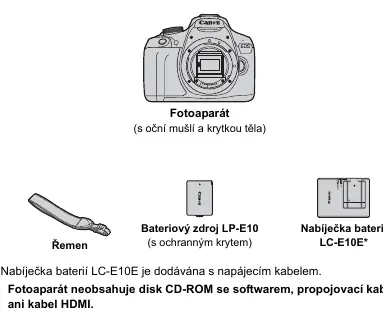
- Camera body (with eyecup and body cap)
- Strap
- Battery pack LP-E10 (with protective cover)
- Battery charger LC-E10E (with power cable)
Note: The package does not include a CD-ROM with software, a connection cable, or an HDMI cable.
Initial usage
To familiarize yourself with the camera, take several test shots and review the results. This will help you understand the camera's functions better. Keep this manual in a safe place for future reference.
Safety and handling
To avoid accidents and poor quality images, read the "Safety Instructions" (pages 20-22) and "Handling Instructions" (pages 23-25) before you start shooting.
Manufacturer information
Canon Inc.
Practical help
Common problems
Check the package contents against the list in the manual. If any item is missing, contact your dealer immediately.
The camera does not include a CD-ROM with software, a connection cable, or an HDMI cable in the box.
Before use
- Check package contents against the list
- Read safety instructions (pages 20-22)
- Read handling instructions (pages 23-25)
- Charge the battery LP-E10
- Take test shots to familiarize with functions

Manual page author
Emily Carter
User documentation editor
Prepares concise manual descriptions and highlights the most useful setup, operation, and maintenance information for readers.