15W Charging Station Owner’s Manual
Comprehensive guide for the 15W Charging Station, covering technical specifications, wireless and wired charging instructions, safety precautions, and maintenance tips.
Table of contents
Product Overview
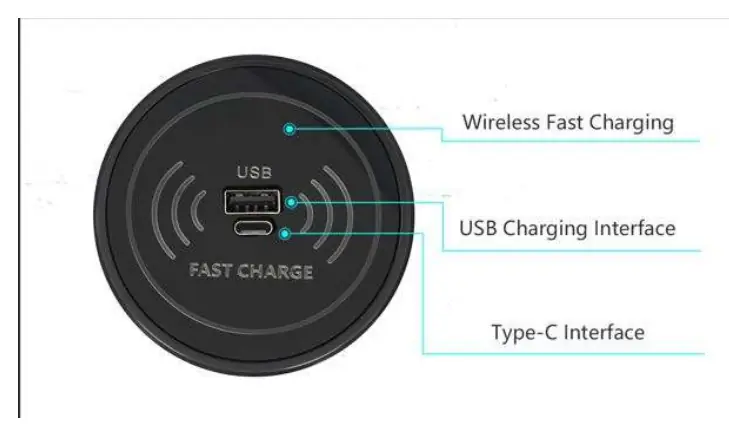
The 15W Charging Station is a versatile power solution designed to support both wireless and wired charging. It is compatible with the WPCv1.2.4 standard and supports various wireless charging outputs, including 15W, 10W, 7.5W, and 5W, making it suitable for a wide range of Qi-enabled mobile devices.
Technical Specifications
- Wireless Charging Output: 15W/10W/7.5W/5W
- Wired Charging Output: 10W
- Input Voltage: DC 9-12V/2-3A
- Wired Interface: USB and Type-C ports
- Working Frequency: 110kHz-205kHz
- Safety Features: Built-in smart chip for over-current, short-circuit, and over-temperature protection
Operating Instructions
For wireless charging, place your device on the front surface of the charger. It is recommended to maintain zero distance between the device and the charging surface for optimal efficiency. When using the wired ports, the device provides 10W of power. Note that if both the USB and Type-C ports are used simultaneously, the total charging power is limited to 5V 1A.
Safety and Maintenance
To ensure the longevity and safety of your charging station, please adhere to the following guidelines:
- Keep the device away from extreme temperatures, specifically below -20 degrees Celsius and above 45 degrees Celsius.
- Keep the unit out of reach of children.
- Clean the surface only with a soft, dry cloth.
- Do not use chemicals, soaps, or detergents to clean the device, as these may damage the surface.
Regulatory Compliance
This device complies with Part 15 of the FCC Rules. Operation is subject to the condition that the device does not cause harmful interference and must accept any interference received. To maintain compliance with RF exposure guidelines, ensure a minimum distance of 20cm between the radiator and your body during operation.

Manual page author
Emily Carter
User documentation editor
Prepares concise manual descriptions and highlights the most useful setup, operation, and maintenance information for readers.