User Guide for City Theatrical Multiverse Connect Module 2.4GHz
Quick installation guide for the City Theatrical Multiverse Connect Module 2.4GHz (P/N 5914). Learn how to attach the module and antenna to Martin MAC Viper XIP fixtures for wireless DMX/RDM integration.
Quick answers from the manual
Quick answer
- The Multiverse Connect Module 2.4GHz (P/N 5914) is installed by plugging it into the fixture base, securing it with screws, and attaching the 2.4GHz antenna. p. 1
Key actions
- Install the module p. 1
Technical specifications
| Parameter | Value | Meaning | Pages |
|---|---|---|---|
| Antenna | 2dBi Omni Antenna, 2.3" | Standard antenna for the 2.4GHz model | p. 1 |
Where to find it in the PDF
- Installation and Overview p. 1
Table of contents
Quick guide from the manual
This document provides instructions for installing the City Theatrical Multiverse Connect Module (P/N 5914) onto compatible lighting fixtures, specifically the Martin MAC Viper XIP. The module enables wireless DMX/RDM capabilities.
Installation
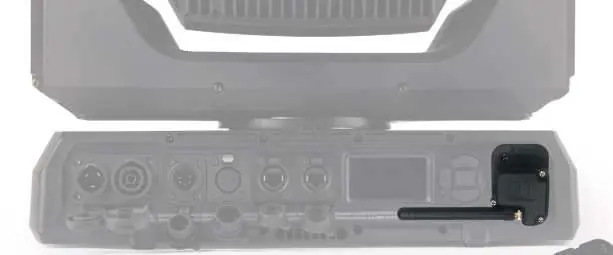
- Plug the Multiverse Connect Module into the fixture base.
- Secure the module onto the fixture using a Phillips head screwdriver and the screws provided with the fixture.
- Attach the 2.4GHz antenna to the module.
Technical Specifications
The 2.4GHz model (P/N 5914) utilizes a 2dBi Omni Antenna, 2.3 inches (P/N 5729), which is compatible with Multiverse SHoW Baby devices.
Practical help
Before use
- Ensure you have a Phillips head screwdriver.
- Verify the fixture is a compatible model (e.g., Martin MAC Viper XIP).
- Locate the screws provided with the fixture.
Images and diagrams
- The installation process involves plugging the module into the fixture base, screwing it in, and attaching the antenna.

Manual page author
David Miller
Documentation analyst
Organizes user manual content into clear summaries, with attention to model details, product context, and everyday usability.