CMS Electracom Pop Up In Desk Unit Installation Guide
Installation guide for the CMS Electracom pop-up power module. Includes cut-out dimensions, mounting instructions, and connection steps for a secure desk installation.
Quick installation guide
This document provides instructions for installing the CMS Electracom Pop Up In Desk Unit. Ensure you have the correct tools and follow the safety guidelines for electrical installations.
Installation steps
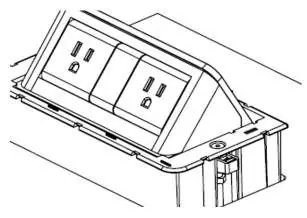
- Cut out: Determine the desired orientation and cut a hole in the desk surface. The required cut-out dimensions are 200mm x 100mm.
- Insert product: Fold the clamps into the provision within the housing. Align the housing in the cut-out and insert it into the desk.
- Tighten screws: Screw through the plastic housing and clamps so that they rotate out of the housing. Tighten screws until the assembly clamps down and is secure. Important: Do not over-tighten; tighten by hand only.
- Clip on cover: Align the clips on the underside of the cover with the provisions in the housing. Secure the top cover and push down above where the clips are positioned.
- Connect to power: Plug the unit into a suitable power source.
Practical help
Common problems
Unit not secure
Ensure clamps are rotated out and screws are tightened by hand until the unit is firmly held against the desk surface.
Housing damage
Do not use power tools to tighten screws. Tighten by hand only to avoid cracking the plastic housing.
Before use
- Verify desk surface thickness is suitable for the unit
- Confirm cut-out dimensions are exactly 200mm x 100mm
- Ensure power source is accessible and compatible with the plug type

Manual page author
Michael Turner
Technical manual editor
Reviews PDF manuals for structure, safety notes, and practical product details so readers can find the right information quickly.