Commercial Electric 16-Inch Turbo Fan
User guide for the Commercial Electric 16-inch 3-speed high velocity turbo fan, including assembly, wall-mounting instructions, operation, and maintenance.
Table of contents
Product Overview
The Commercial Electric 16-inch 3-speed high velocity turbo fan is designed for effective air circulation. It features a durable stand and adjustable tilt angle for versatile airflow direction. The fan offers three speed settings to suit your cooling needs.
Safety Information
Read and save these instructions. Failure to follow safety guidelines may result in fire, electric shock, or personal injury. Always unplug the fan before moving it or performing maintenance. Do not touch the fan with wet hands. Do not use the fan if the power cord or plug is damaged, and never use an extension cord. This fan is not intended for outdoor use and should not be immersed in water. Keep hands and objects away from the guard and moving parts. Do not use with solid-state speed control devices. Ensure the front and rear guard screws are fully tightened before operation.
Assembly and Mounting
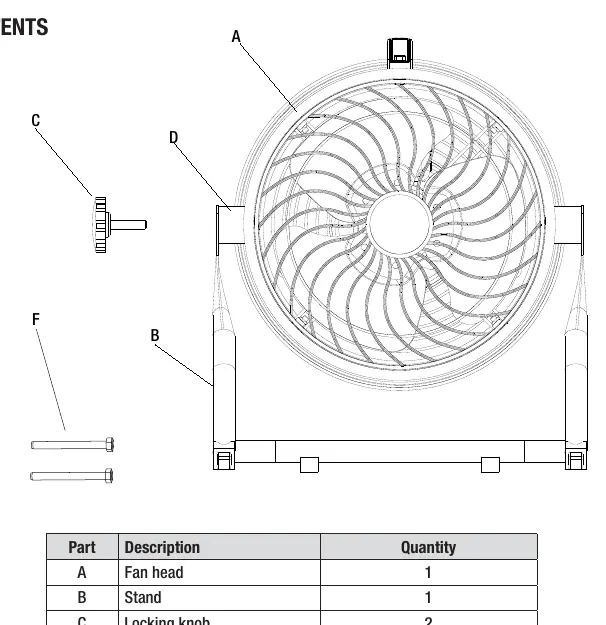
To assemble the fan, position the rubber pads between the fan head and the stand, aligning them with the pre-drilled holes. Secure the stand to the fan head using the provided locking knobs on both sides. For optional wall mounting, ensure the surface is a wooden wall capable of supporting the fan. It is recommended that mounting be performed by a qualified electrician. Mark hole locations, drill pilot holes, and secure the stand using the provided washers and screws.
Operation
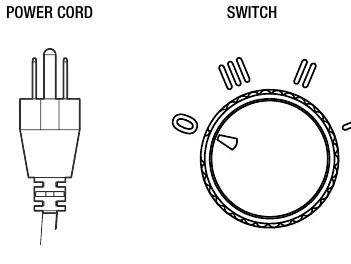
To adjust the tilt angle, loosen the locking knobs on both sides, tilt the fan head to the desired position, and tighten the knobs clockwise. To operate, plug the power cord into an outlet and turn the switch to the desired speed setting: 0 for off, I for low, II for medium, and III for high.
Maintenance and Cleaning
The fan includes a resettable thermal protector. If the fan stops due to motor overheating, wait several minutes for it to cool down before restarting. To clean, unplug the fan and wipe surfaces with a slightly moistened cloth. Do not immerse the fan in water. Dust can be removed from the grill using a vacuum cleaner or by removing the front grill via the securing clip.

Manual page author
Emily Carter
User documentation editor
Prepares concise manual descriptions and highlights the most useful setup, operation, and maintenance information for readers.