User Manual for Conceptronic THANA 01B Notebook Cooling Pad
Quick guide for the Conceptronic THANA 01B Notebook Cooling Pad. Learn how to install and connect your cooling pad via USB for optimal laptop cooling.
Table of contents
Quick guide from the manual
This document provides essential instructions for setting up the Conceptronic THANA 01B Notebook Cooling Pad. The device is designed to be powered directly by your notebook's USB port, requiring no external power supply or software installation.
Package contents
- Notebook Cooling Pad
- Multi-language quick guide
Installation and usage
Follow these steps to install and use your cooling pad:
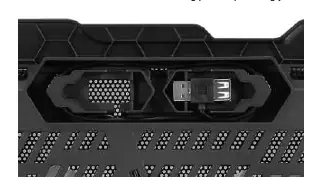
- Turn on your notebook and ensure there is a free USB port available.
- Locate the USB connector on the back of the cooling pad.
- Plug the USB connector into the free USB port on your notebook to power the fan.
- Place your notebook firmly on the top side of the cooling pad.
Practical help
Common problems
Ensure the USB connector is firmly plugged into a powered USB port on your notebook.
Ensure the notebook is placed firmly and centered on the top surface of the cooling pad.
Before use
- Ensure your notebook is turned on.
- Verify that your notebook has an available USB port.
- Locate the USB connector on the back of the cooling pad.

Manual page author
David Miller
Documentation analyst
Organizes user manual content into clear summaries, with attention to model details, product context, and everyday usability.