Crownful 10L Mini Fridge Cooler & Warmer
Quick guide for the Crownful 10L Mini Fridge. Learn how to set up, operate, optimize cooling/warming performance, and troubleshoot common issues.
Table of contents
Manual images
Click an image to enlargeQuick guide from the manual
This mini fridge is designed for cooling and warming food and drinks. To ensure safe and optimal operation, always keep the unit's fans clear of debris and maintain at least 2 inches of clearance around the vents for proper airflow. Before plugging the unit into any power source, ensure the switch on the back is set to the OFF position. When using the unit in a vehicle, always start the engine first before plugging in the DC power cord to prevent power surges.
Getting started
The unit includes both AC and DC power cords for indoor and outdoor use.
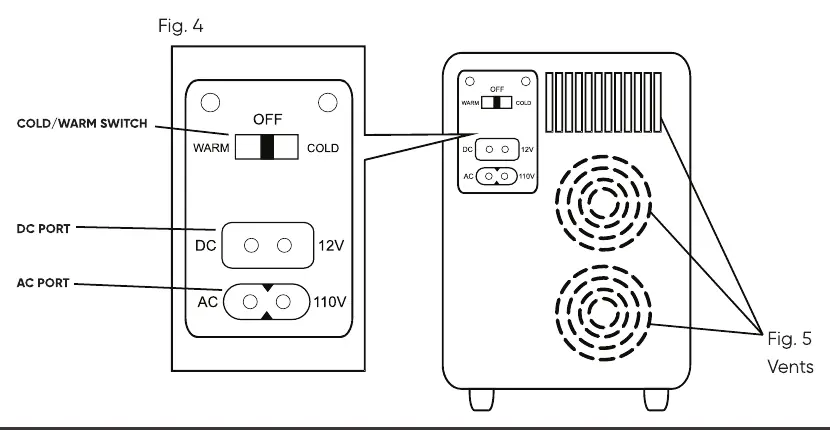
- Home application: Insert the AC connector into the unit's AC port and plug the AC plug into a 100-120V wall outlet.
- Motor vehicle application: Start the vehicle engine first. Insert the DC connector into the unit's DC port and the DC plug into the vehicle's cigarette-lighter outlet.
- Turning on: Use the switch on the back to select COLD or WARM mode. A green light indicates cooling mode; a red light indicates warming mode.
Optimizing performance
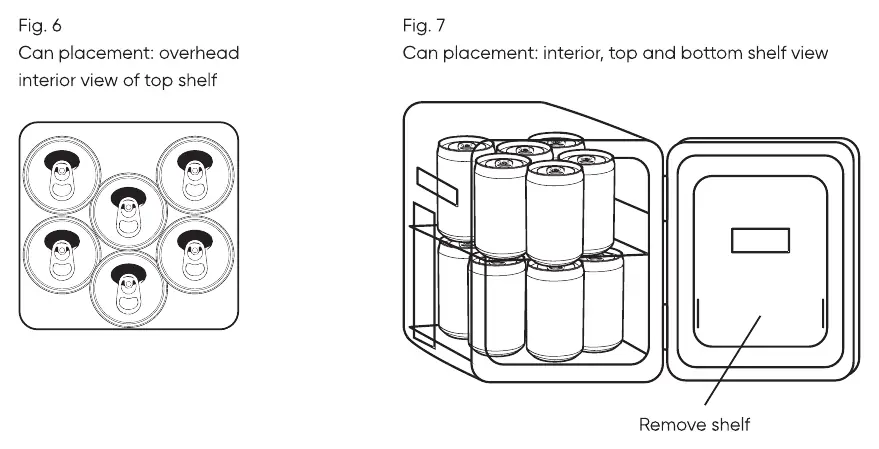
For best results, place pre-chilled food and drinks into the unit. If items are at room temperature, it may take 2-3 hours to chill them. The unit is not designed to heat cold food but will preserve the temperature of hot food. The fridge can hold up to 12 standard 12 oz soda cans. You can remove the interior shelves by gently pushing them up and sliding them out to accommodate larger items.
Troubleshooting
If you encounter issues, check the following:
- Blinking green light: The fan may not be rotating. Contact customer support.
- Loud noise: Check for obstructions around the fan. Ensure 2-inch clearance.
- Unit not cooling: Verify the power source. If using in a car, ensure the engine is running.
- Water inside: Condensation is normal in thermo-electric units. Wipe the interior dry with a soft cloth once or twice a week.
Technical specifications
The unit operates on 100-120V AC or 12V DC. It cools down to 35-40°F below ambient temperature and warms up to 149°F. The unit weighs approximately 8.36 lbs (3.8 kg).
Practical help
Common problems
The unit fan is likely not rotating. Contact customer support.
Check the power source. If in a car, ensure the engine is running. If in a home, try the DC cord in a car to test the unit.
This is normal condensation. Wipe the interior dry with a soft cloth once or twice a week.
Check for obstructions around the fan and ensure at least 2 inches of clearance.
Before use
- Ensure the switch on the back is set to OFF before plugging in.
- Provide at least 2 inches of clearance around the vents.
- For car use, start the engine before plugging in the DC cord.
- Ensure the power source is 100-120V AC or 12V DC.
- Do not place the unit upside down.
Specs in practice
- Cooling Capacity
- Cools down to 35-40°F below ambient temperature.
- Warming Capacity
- Warms up to 149°F.
Images and diagrams
- Fig 4/5: Shows the back panel layout, including the COLD/OFF/WARM switch, DC/AC ports, and ventilation area.
- Fig 6/7: Illustrates how to remove interior shelves and the recommended configuration for storing 12 soda cans.
Model compatibility
- Not compatible with 220V outlets.
- Cannot be used with a power bank.
- Not designed to freeze items; only keeps them cool.

Manual page author
Michael Turner
Technical manual editor
Reviews PDF manuals for structure, safety notes, and practical product details so readers can find the right information quickly.