D'Addario PW-INSTC-25 DIY Solderless Instrument Connectors Assembly Guide
Learn how to assemble your D'Addario PW-INSTC-25 DIY Solderless Instrument Connectors. This guide provides step-by-step instructions for cutting the cable and securing the connection for your pedalboard setup.
Table of contents
Manual images
Click an image to enlargeQuick Assembly Guide
Follow these steps to assemble your D'Addario DIY Solderless Instrument Connectors:
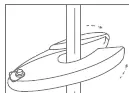
- Cut the cable: Cleanly cut the cable to your desired length. Ensure there are no loose or overhanging strands of shielding.
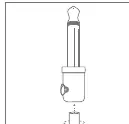
- Insert the cable: Loosen the set screw on the plug to allow clear entry to the plug barrel. Push the cable into the open plug end using a "twisting" motion until it is fully seated.
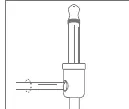
- Secure the connection: Completely tighten the set screw to lock the cable in place.
Product Overview
The D'Addario DIY Solderless Pedalboard Cable System is designed for custom wiring of pedalboards or rack gear. It features the patented Geo-Tip design, which provides an improved connection in any pedal, amplifier, or jack.
Compatibility
These connectors are designed for use with D'Addario 1/4" DIY Instrument Cable only. Using other cable types may result in poor performance or connection failure.
Practical help
Common problems
Ensure a clean, straight cut on the cable and verify that no loose strands are hanging over the edge before inserting into the plug.
Use a "twisting" motion when pushing the cable into the plug end until it is fully seated.
Before use
- Ensure you are using D'Addario 1/4" DIY Instrument Cable.
- Prepare a sharp cutting tool for a clean cable cut.
- Verify the set screw is loosened before inserting the cable.

Manual page author
Emily Carter
User documentation editor
Prepares concise manual descriptions and highlights the most useful setup, operation, and maintenance information for readers.