Quick Start Guide for D-Link DGS-1008P Gigabit Switch
A concise quick start guide for the D-Link DGS-1008P Gigabit Switch. This guide provides essential connection instructions and setup diagrams to help you install your device.
Table of contents
Quick Start Guide
This guide provides the basic steps to set up your D-Link DGS-1008P Gigabit Switch. Ensure you have all components ready before beginning the installation.
Device Connection
To set up your switch, follow these steps based on the provided diagram:
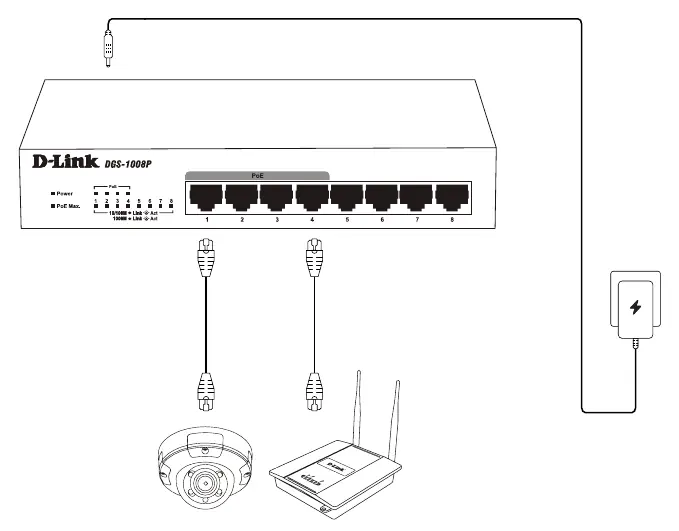
- Connect the power adapter to the power port on the back of the switch.
- Connect your network devices (such as IP cameras or wireless access points) to the PoE ports on the front of the switch using Ethernet cables.
Support and Warranty
For technical support, visit http://www.dlink.com/support.
For warranty information, visit http://www.dlink.com/warranty.
Official resources from the manual
Manufacturer information
D-Link Corporation
Practical help
Before use
- Ensure you have the power adapter provided with the device.
- Verify that your Ethernet cables are in good condition.
- Confirm that your network devices are compatible with the switch's PoE specifications.
Images and diagrams
- The diagram illustrates the connection of the power adapter to the switch.
- It shows how to connect network devices like IP cameras and wireless access points to the PoE ports.

Manual page author
Emily Carter
User documentation editor
Prepares concise manual descriptions and highlights the most useful setup, operation, and maintenance information for readers.