Installation Guide for Danfoss AK-XM 101A, AK-XM 205A, AK-XM 205B Transmitter Fault Detection
A concise installation guide for setting up transmitter fault detection on Danfoss AK-XM 101A, AK-XM 205A, and AK-XM 205B modules. Includes essential wiring diagrams and resistor installation requirements for single and multi-module...
Table of contents
Manual images
Click an image to enlargeQuick guide from the manual
This document provides instructions for connecting the AKS 32R transmitter to Danfoss AK-XM controller modules. The most critical requirement is the installation of a 47 kohm resistor when connecting to an extension module to ensure proper sensor error detection.
Installation and wiring
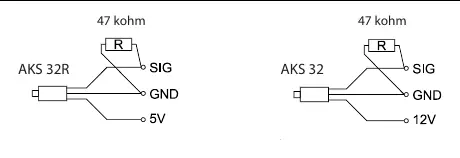
When using the AKS 32R transmitter, it should be connected to the controller module. If the transmitter is connected to an extension module, you must mount the enclosed 47 kohm resistor. This component is essential for the system to correctly detect any potential sensor errors.
Multi-module configuration
If a single AKS 32R transmitter is required to transmit a signal to multiple extension modules (two, three, four, or five), specific wiring rules apply:
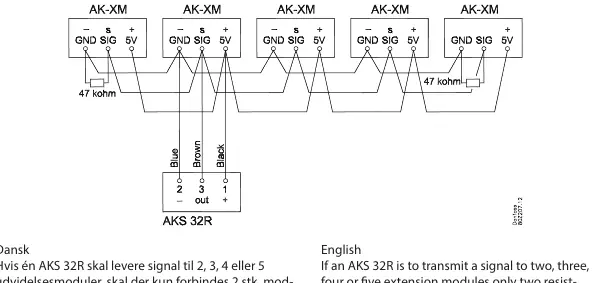
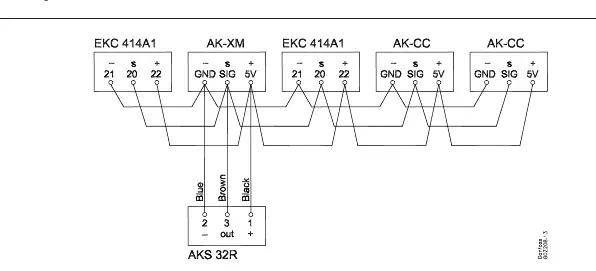
- Resistor placement: Only two 47 kohm resistors are required for the entire signal line.
- Location: Place one resistor at each end of the signal line.
Note: The resistors should be omitted if the remaining controllers in the system are of a different type.
Manufacturer information
Danfoss A/S
Practical help
Common problems
Ensure that the 47 kohm resistor is correctly mounted when the transmitter is connected to an extension module.
Verify that only two resistors are installed in the entire signal loop, specifically one at each end of the signal line.
Before use
- Identify if you are connecting to a standard controller module or an extension module.
- Verify you are using the AKS 32R transmitter.
- Ensure you have the required 47 kohm resistors available for installation.
- Confirm the type of other controllers in the system to determine if resistors are required.

Manual page author
Emily Carter
User documentation editor
Prepares concise manual descriptions and highlights the most useful setup, operation, and maintenance information for readers.