Danfoss LCP 31-RJ45 Converter Plug Installation
Installation guide for the Danfoss LCP 31-RJ45 Converter Plug. Includes mounting instructions, torque specifications, and connection requirements for the VLT HVAC Basic Drive FC 101.
Table of contents
Manual images
Click an image to enlargeQuick Installation Guide
This document provides instructions for installing the LCP 31-RJ45 Converter Plug on a VLT HVAC Basic Drive FC 101. Ensure you have all supplied items and the required LCP 31 control panel before beginning.
Installation Steps
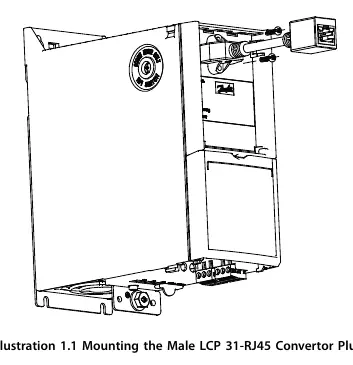
- Mount the male LCP 31-RJ45 converter plug onto the frequency converter.
- Secure the plug using 2 thread-cutting screws. Tighten to 1.3 Nm (11.5 in-lb).
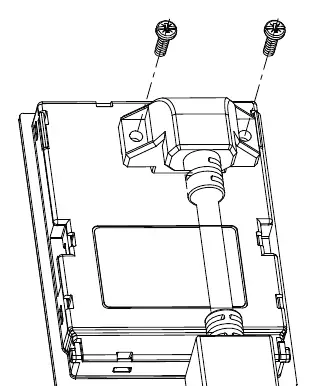
- Mount the female LCP 31-RJ45 converter plug onto the LCP 31 (local control panel).
- Secure the plug using 2 thread-cutting screws. Tighten to 1.3 Nm (11.5 in-lb).
- Connect the two converter plugs using a shielded Ethernet cable, with a maximum length of 15 m (49.2 ft).
Requirements and Safety
The converter plug is designed exclusively for VLT HVAC Drive FC 101 IP20 enclosures (sizes H1-H10). Ensure you have the LCP 31 (ordering number 132B0200) available for the installation.
Manufacturer information
Danfoss A/S
Practical help
Before use
- Verify the drive is a VLT HVAC Drive FC 101 with an IP20 enclosure (H1-H10).
- Ensure you have the LCP 31 local control panel (ordering number 132B0200).
- Obtain a shielded Ethernet cable (maximum length 15 m / 49.2 ft).
- Check that all 4 thread-cutting screws are present.
Specs in practice
- Cable Length
- Maximum 15 m (49.2 ft) for the shielded Ethernet cable.

Manual page author
Emily Carter
User documentation editor
Prepares concise manual descriptions and highlights the most useful setup, operation, and maintenance information for readers.