Installation Guide for Danfoss RAV & RAVL Adapter
Learn how to install and remove the Danfoss RAV & RAVL adapter for Danfoss Ally and Eco thermostats. This guide covers the mounting process and the steps to safely remove a pre-mounted adapter.
Table of contents
Quick guide from the manual
This document provides instructions for installing the Danfoss RAV & RAVL adapter and removing a pre-mounted adapter from Danfoss Ally and Danfoss Eco thermostats. Ensure you have the correct adapter type for your specific radiator valve.
Installation
The RAV & RAVL adapter is designed to connect Danfoss Ally and Eco thermostats to specific radiator valves. Refer to the installation diagrams for the correct assembly sequence for your valve type (RAV or RAVL). Ensure the adapter is securely clicked into place before attaching the thermostat.
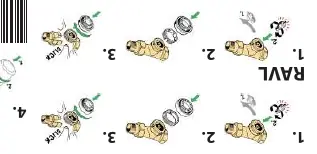
Removing a pre-mounted adapter
If you need to remove an existing adapter, follow these steps:
- Enter Mounting Mode: Press and hold the clock icon button on the thermostat until the large 'M' symbol flashes on the display. This indicates the device is in mounting mode.
- Remove Cover: Take off the thermostat cover.
- Dismount: Press firmly on the release tab and unscrew the thermostat from the adapter.
Manufacturer information
Danfoss A/S
Practical help
Common problems
Ensure the device is in 'mounting mode' (indicated by a flashing 'M' on the display) before attempting to press the tab and unscrew.
Verify that you are using the correct adapter type (RAV or RAVL) for your specific radiator valve body.
Before use
- Identify your valve type (RAV or RAVL).
- Ensure you have the correct adapter kit (014G0250).
- Verify compatibility with your Danfoss Ally or Eco thermostat.
- Ensure the thermostat is ready for mounting/dismounting.

Manual page author
Emily Carter
User documentation editor
Prepares concise manual descriptions and highlights the most useful setup, operation, and maintenance information for readers.