Installation and Removal Guide for Danfoss 014G0253 RTD-Adapter
Step-by-step guide for the Danfoss 014G0253 RTD-Adapter. Learn how to install the adapter and safely remove a pre-mounted thermostat from your Danfoss Ally or Eco system.
Table of contents
Quick guide from the manual
The Danfoss 014G0253 RTD-Adapter is a specialized accessory designed for use with Danfoss Ally and Danfoss Eco smart thermostats. This guide provides the necessary steps for installing the adapter and the specific procedure required to remove a pre-mounted thermostat from the adapter.
Installation
The adapter is designed to be screwed onto the valve body. Ensure the adapter is aligned correctly with the valve threads before tightening to ensure a secure fit.
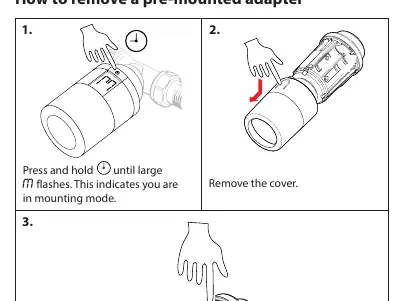
Removing a pre-mounted adapter
To safely remove the thermostat from the adapter, you must first set the device to mounting mode. Follow these steps:
- Enter Mounting Mode: Press and hold the button on the thermostat until a large M flashes on the display. This indicates the device is in mounting mode.
- Remove Cover: Take off the thermostat cover.
- Detach: Press firmly on the release tab and unscrew the thermostat from the adapter.
Manufacturer information
Danfoss A/S
Practical help
Common problems
Ensure the thermostat is in mounting mode (indicated by a flashing 'M' on the display) and that you are pressing the release tab firmly while unscrewing.
Before use
- Verify compatibility with Danfoss Ally or Danfoss Eco thermostats.
- Ensure you have the correct adapter model: 014G0253.
- Check that the valve body is clean and ready for the adapter.

Manual page author
David Miller
Documentation analyst
Organizes user manual content into clear summaries, with attention to model details, product context, and everyday usability.