Home Appliances / Ovens
Dash 10L Compact Air Fryer Oven Quickstart Guide
Quickstart guide for the Dash 10L Compact Air Fryer Oven, covering control panel operation, cooking modes, and essential usage tips.
Table of contents
Understanding the Control Panel
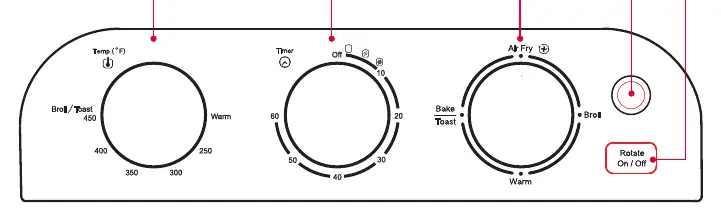
The Dash 10L Compact Air Fryer Oven features an intuitive control panel designed for ease of use. The Temperature Dial allows you to set your desired heat, ranging from Warm up to 450°F, including a specific Broil/Toasting setting. The Timer Dial controls the cooking duration up to 60 minutes. To set a time under 20 minutes, turn the dial past 20 first, then back to your desired time. The Function Dial lets you select your preferred cooking method, while the Rotate Button activates the rotating basket feature. The Power Light indicates when the oven is active, and the interior light illuminates when the unit is in operation.
Operating Your Air Fryer Oven
The oven offers multiple cooking functions including Air Fry, Bake, Broil, Toast, and Warm. For standard air frying, place the basket on the oven rack in position 2. For items that may drip, such as meat, place the basket on top of the baking pan in position 1 to protect the heating element. When using the rotating basket, ensure the left side is secured to the gear first, then hook the right side. Always use the provided removal tool and kitchen gloves when handling hot accessories.
Helpful Cooking Tips
For optimal results, you can lightly spray food with oil to enhance crispness. Larger items like chicken cutlets should be flipped halfway through the cooking cycle, while smaller items like fries can be shaken to ensure even browning. Opening the oven door to flip or shake food will not disrupt the cooking process. If you need to stop the oven before the timer finishes, simply turn the Timer Dial to OFF. It is normal to observe some moisture on the oven door during certain cooking cycles.
Safety and Maintenance
Always place the Drip Tray at the bottom of the oven below the heating element before cooking. Be extremely careful when inserting or removing the Drip Tray to avoid scraping the heating element, as this can cause damage. Never place the Air Fry Basket or Baking Pan directly on the bottom heating element. When finished, allow the basket to cool on a heat-resistant surface before removing food. Always keep this guide for future reference and consult the full instruction manual for comprehensive safety and performance details.
Manufacturer information
Dash
Practical help
Common problems
Basket does not rotate
Turn the timer to OFF and re-adjust the gear alignment on the interior side.
Need to stop cooking early
Turn the Timer Dial to the OFF position.
Drips on heating element
Place the Air Fry Basket on top of the Baking Pan in position 1.
Before use
- Place Drip Tray at the bottom of the oven
- Ensure all accessories are clean
- Check that the oven is on a flat, heat-resistant surface
- Verify the heating element is clear of obstructions
Specs in practice
- Temperature Range
- Warm to 450°F, including Broil/Toast settings.
Images and diagrams
- Temperature Dial: Sets heat level.
- Timer Dial: Sets cooking time.
- Function Dial: Selects cooking mode.
- Rotate Button: Toggles basket rotation.
- Power Light: Indicates unit is on.
Model compatibility
- Convection baking is faster than standard baking; check food periodically.
- Always use the removal tool and kitchen gloves for hot accessories.

Manual page author
David Miller
Documentation analyst
Organizes user manual content into clear summaries, with attention to model details, product context, and everyday usability.