DeepCool FL Series 120/140mm Addressable RGB Fan
Learn how to install and connect your DeepCool FL Series 120/140mm addressable RGB fan. This guide covers component identification, case mounting, and motherboard header connections.
Table of contents
Manual images
Click an image to enlargeQuick guide from the manual
This guide provides the necessary steps to install and connect your DeepCool FL Series fan. Ensure your motherboard supports 5V addressable RGB headers before attempting to connect the lighting features.
Package contents
- 1x Fan
- 4x Mounting screws
- 1x Connection cable
Installation
To install the fan into your PC case:
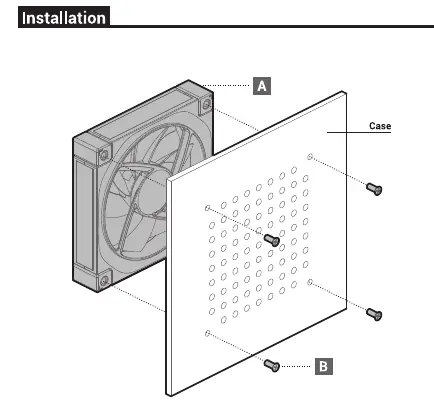
- Position the fan against the mounting holes on your computer case.
- Secure the fan using the four provided screws through the case panel into the fan frame.
Connection
The fan requires two separate connections to function correctly:
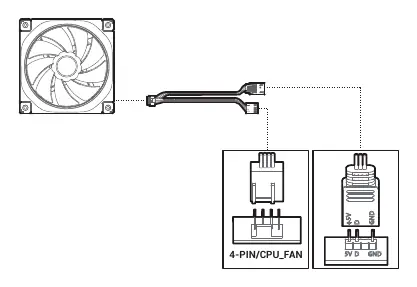
- 4-PIN/CPU_FAN: Connect this to the motherboard's 4-pin fan header to provide power and speed control.
- 5V D GND: Connect this to the motherboard's 5V addressable RGB header to enable lighting effects.
Manufacturer information
DeepCool
Practical help
Common problems
Ensure the 4-pin connector is securely plugged into a motherboard fan header.
Verify the 5V addressable RGB cable is connected to the correct 5V header on the motherboard. Do not connect to 12V RGB headers as this may damage the device.
Before use
- Verify the PC case has an available 120mm or 140mm fan mounting location.
- Ensure the motherboard has an available 4-pin fan header.
- Confirm the motherboard supports 5V addressable RGB headers.
- Check that all necessary screws are present.

Manual page author
Michael Turner
Technical manual editor
Reviews PDF manuals for structure, safety notes, and practical product details so readers can find the right information quickly.