DEFA Solid 1-Phase Charging Station Installation
A comprehensive installation guide for the DEFA Solid 1-Phase charging station, covering cable preparation, mounting, wiring, and current configuration.
Table of contents
Manual images
Click an image to enlargeQuick Installation Guide
This document provides the essential steps for installing the DEFA Solid 1-Phase charging station. Ensure all electrical work is performed by a qualified professional in accordance with local regulations.
Installation Steps
Step 1: Cable Preparation
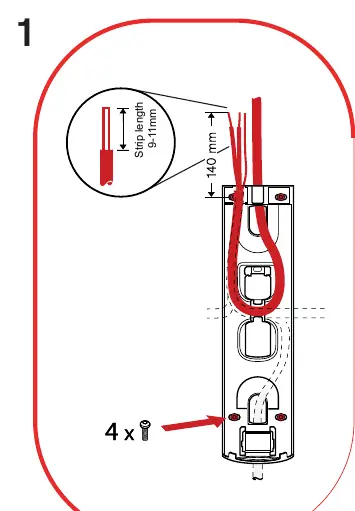
Prepare the power cable by stripping the insulation. The required strip length is 9-11mm. Ensure the cable is routed correctly through the housing as indicated in the installation diagram.
Step 2: Mounting
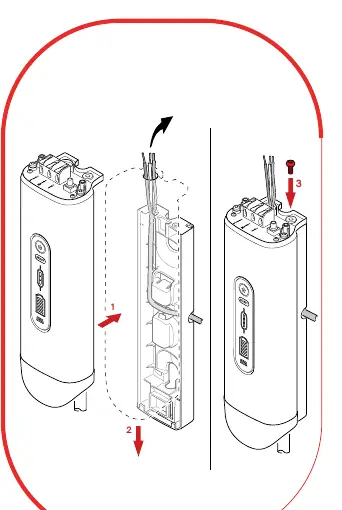
Mount the charging station base to the wall using the provided mounting points. Ensure the unit is level and securely fastened before proceeding to wiring.
Step 3: Wiring and Current Settings
Connect the power supply wires (L, N, PE) to the designated terminals. Configure the charging current using the rotary switch located on the terminal block. The settings correspond to the following amperage values:
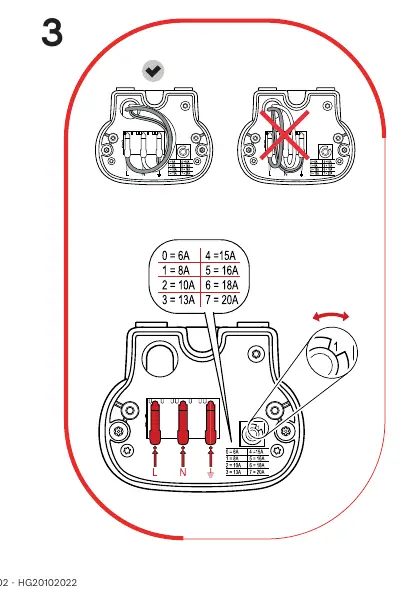
- 0: 6A
- 1: 8A
- 2: 10A
- 3: 13A
- 4: 15A
- 5: 16A
- 6: 18A
- 7: 20A
Step 4: Final Assembly
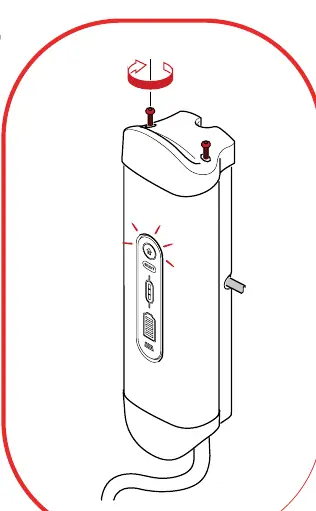
Once wiring and current settings are verified, secure the front cover of the charging station using the provided screws to close the unit.
Practical help
Before use
- Ensure the power supply is disconnected before starting installation
- Verify the cable strip length is exactly 9-11mm
- Confirm the desired amperage setting on the rotary switch
- Ensure all wiring connections (L, N, PE) are secure
Specs in practice
- Current Settings (Rotary Switch)
- Adjusts the maximum charging current: 0=6A, 1=8A, 2=10A, 3=13A, 4=15A, 5=16A, 6=18A, 7=20A
- Strip Length
- The length of insulation to remove from the power cable (9-11mm)

Manual page author
David Miller
Documentation analyst
Organizes user manual content into clear summaries, with attention to model details, product context, and everyday usability.