User Manual for Dell Inspiron 5410 2-in-1
Quick start guide and setup instructions for the Dell Inspiron 5410 2-in-1 laptop. Learn how to power on, set up Windows, and identify ports.
Quick answers from the manual
Quick answer
- To set up the Dell Inspiron 5410 2-in-1, connect the power adapter, press the power button, and follow the on-screen Windows setup instructions. p. 1
Key actions
- Connect the power adapter to the laptop. p. 1
- Press the power button to turn on the laptop. p. 1
First start
- Connect the power adapter, press the power button, and follow the Windows setup instructions. p. 1
Technical specifications
| Parameter | Value | Meaning | Pages |
|---|---|---|---|
| Regulatory Model | P147G | Official regulatory model identifier | p. 2 |
Where to find it in the PDF
- Quick Start Guide p. 1
- Regulatory and Ports p. 2
Table of contents
Manual images
Click an image to enlargeQuick guide from the manual
This document provides the initial setup procedure and port identification for the Dell Inspiron 5410 2-in-1 laptop.
Initial Setup
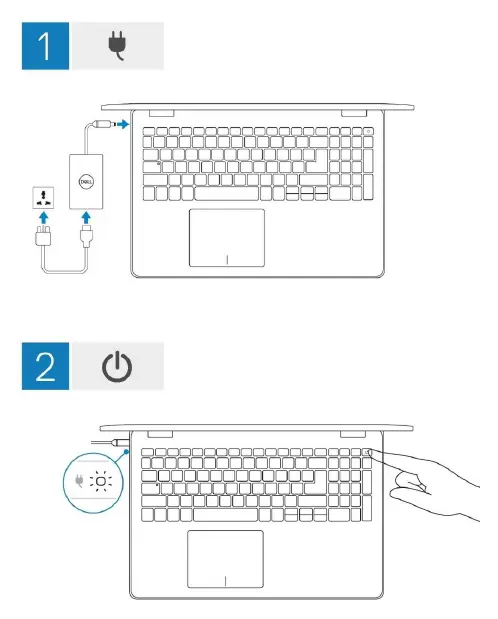
- Connect the power adapter to the laptop.
- Press the power button to turn on the computer.
- Follow the on-screen instructions in Windows to complete the setup.
Ports and Connectors
The device features the following connectivity options:
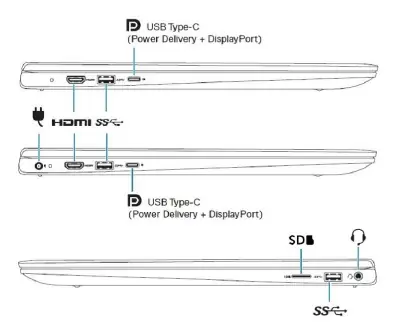
- USB Type-C (supports Power Delivery and DisplayPort)
- HDMI port
- SD card slot
- Headset port
Regulatory Information
The regulatory model for this device is P147G, and the regulatory type is P147G002.
Manufacturer information
Dell Inc.
Practical help
Before use
- Connect the power adapter to the laptop
- Press the power button to turn on the device
- Follow the on-screen Windows setup instructions
Images and diagrams
- Step 1: Connect power adapter
- Step 2: Press power button
- Step 3: Complete Windows setup

Manual page author
Emily Carter
User documentation editor
Prepares concise manual descriptions and highlights the most useful setup, operation, and maintenance information for readers.