User Manual for Delock 96400 USB UHD Webcam
Quick guide for the Delock 96400 USB UHD Webcam. Learn about system requirements, installation steps, and safety instructions for your 4K webcam.
Quick answers from the manual
Quick answer
- The Delock 96400 is a Plug & Play device. Simply connect it to a free USB Type-A port on your computer; no software installation is required. p. 1
Key actions
- Connect the webcam to the computer via the USB cable. p. 1
First start
- Place the webcam on the monitor or tripod, then connect the USB cable to the computer. p. 1
Show 2 more answers Show less
Technical specifications
| Parameter | Value | Meaning | Pages |
|---|---|---|---|
| Resolution | 2160p 4K | Ultra High Definition | p. 1 |
| Viewpoint | 110° | Field of view | p. 1 |
Where to find it in the PDF
- Installation and Requirements p. 1, 2
Table of contents
Quick guide from the manual
The Delock 96400 is a Plug & Play USB UHD webcam. It does not require any additional software installation to function. Simply connect the device to your computer to begin using it.
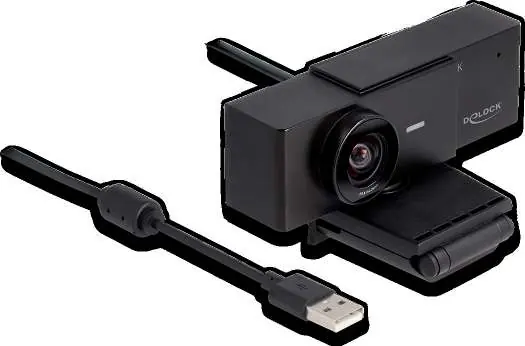
Installation
- Place the webcam on your monitor or attach it to the included tripod.
- Connect the webcam to your computer using the provided USB cable.
- The webcam will connect automatically.
- You can now use the webcam.
System requirements
- Operating System: Windows 10, 10-64, 11 or Linux Kernel 5.8.0 or above.
- Hardware: PC or laptop with a free USB Type-A port.
- Compatibility: PC with UVC support.
Safety instructions
- Protect the product against moisture.
- Protect the product against direct sunlight.
Practical help
Common problems
Webcam not detected
Ensure the USB cable is securely connected to a free USB Type-A port on your computer.
Software installation prompt
No software is required. The device is Plug & Play; ensure your operating system is updated to the supported versions (Windows 10/11 or Linux Kernel 5.8.0+).
Before use
- Verify your computer has a free USB Type-A port.
- Ensure your operating system is Windows 10/11 or Linux Kernel 5.8.0 or higher.
- Confirm your system supports UVC.
- Position the webcam on a monitor or the included tripod.

Manual page author
Michael Turner
Technical manual editor